

Gone are the days when you could just take a physical driving licence at face value. Today, verifying a driving licence online through the official Parivahan Sewa portal is the only way to be sure it’s valid, active, and legitimate. This digital check taps directly into government databases, giving you instant, tamper-proof results that manual checks simply can’t match.
Table of Contents
Why Online DL Verification Is No Longer Optional
The move to digital isn’t just about convenience—it’s a massive leap forward for road safety and fraud prevention. If your business is in logistics, transport, or delivery services, relying on a physical card is a huge gamble.
Think about it: a fraudulent licence could completely invalidate your insurance claim after an accident, leaving your company on the hook for massive damages. Worse, hiring a driver with a fake or expired licence creates serious legal and reputational headaches you just don’t need.
The Real Scale of the Problem
The issue of invalid licences is far more widespread than most people think. Government data paints a startling picture: nearly 30% of driving licences in India, which works out to around 54 million, could be invalid or fraudulent. This number alone shows how broken traditional verification methods are. You can get more details on the challenges of licence verification in India on authbridge.com.
This is where a quick online check becomes indispensable. It creates a direct link to the official RTO database, serving as the ultimate source of truth.
By using portals like Parivahan, you’re not just checking a document. You are confirming a driver’s legal authority to be on the road, backed by official government records. It’s a simple digital step that acts as a powerful tool for managing risk.
Keeping Your Business Safe and Compliant
Even if you’re an individual hiring a personal driver or involved in a private vehicle sale, verifying a licence adds a crucial layer of trust and safety. For businesses, it’s a non-negotiable part of due diligence and maintaining high standards of employee background screening and compliance.
A quick online check instantly confirms:
- Licence Status: Is it active, expired, or has it been suspended?
- Holder’s Details: Do the name and date of birth on the licence actually match the person in front of you?
- Authorised Vehicle Classes: Is the driver legally allowed to operate the specific vehicle they’ll be using, like a heavy commercial truck versus a standard motorcycle?
Ultimately, the ability to verify a driving licence online in India isn’t just a “nice-to-have.” It’s a modern necessity that helps create a safer, more accountable environment for everyone on the road.
What You Need Before You Start
Before you dive into verifying a driving licence online, a little bit of prep work will save you a lot of hassle. Getting your details in order first prevents those annoying error messages and ensures you get the information you need on the first try.
The main place you’ll be working is the Parivahan Sewa portal, which is the official government website run by the Ministry of Road Transport and Highways. This site is the master database for all driving licence and vehicle registration data across India, making it your go-to source for reliable verification.
Essential Information to Have Ready
Before you even open a new browser tab, grab the physical driving licence card. You’ll need two key pieces of information directly from it. These details are non-negotiable for the system to find the right record among millions.
Here’s what you need to have on hand:
- The Full Driving Licence Number: This is a unique alphanumeric code. Pay close attention here—it’s easy to mix up the letter ‘O’ with the number ‘0’, and a single wrong character will prevent the search from working.
- The Holder’s Date of Birth: This must be entered exactly as it appears on the licence, following the correct DD-MM-YYYY format.
Think of these two details as a two-factor key for accessing the public record. They ensure you’re pulling up the correct person’s information, which protects privacy while still allowing for legitimate checks. Without both, the portal simply won’t let you proceed.
How To Verify a Licence on The Parivahan Portal
Alright, you’ve got the driving licence number and the date of birth handy. Perfect. You’re all set to jump onto the official Parivahan Sewa portal. This is the government’s central platform, designed to be the single source of truth for licence details across the country. It makes the whole process to verify a driving licence online in India surprisingly straightforward.
The entire system is built for speed and accuracy. You don’t need to create an account or hand over any personal info beyond the two details you already have. Let’s walk through how to find your way around the site and get the results in just a few clicks.
This simple breakdown shows the core steps for a successful check.
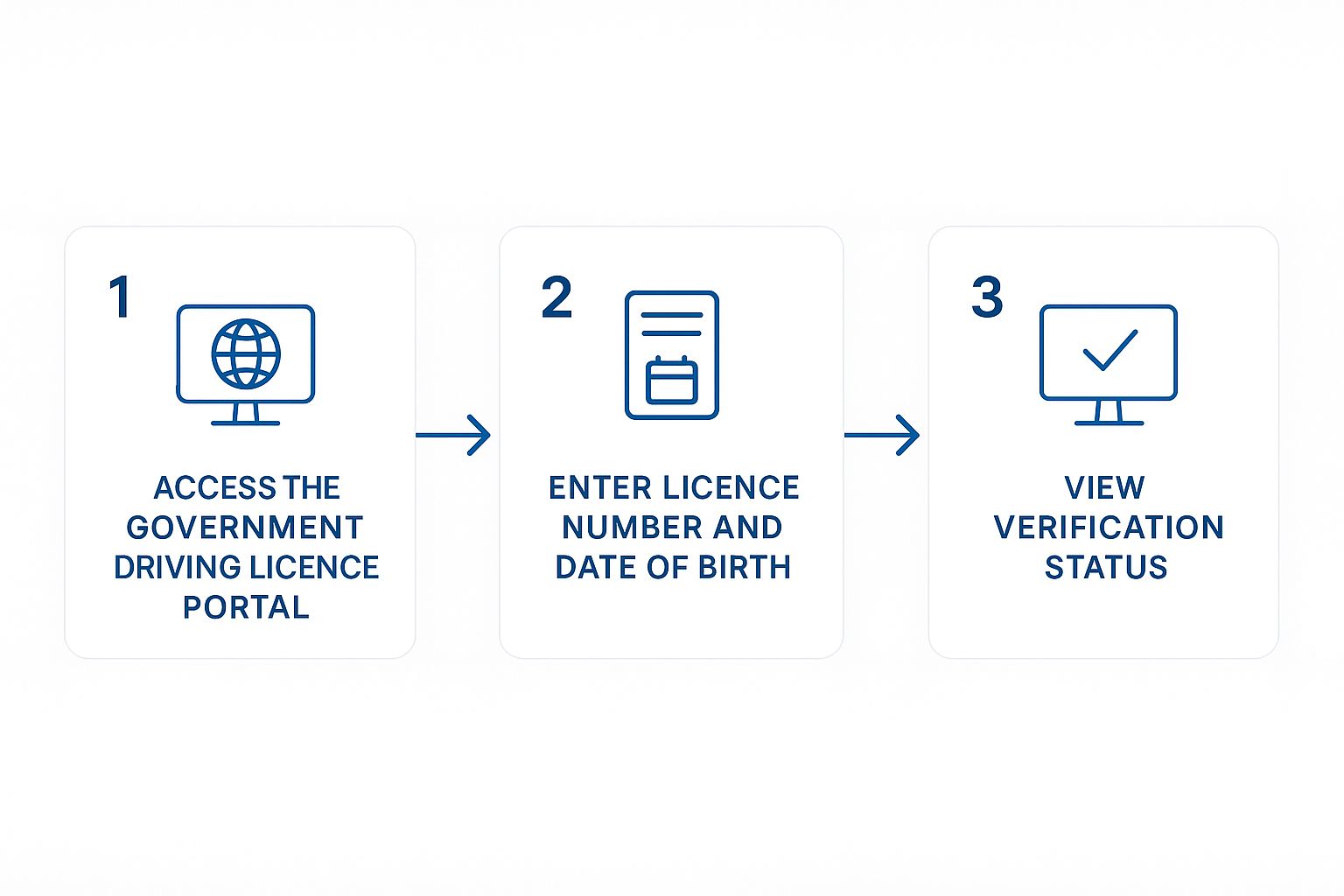
As you can see, the process flows logically from finding the portal to punching in the details and viewing the status. No guesswork involved.
Finding the Right Section on the Portal
First up, head over to the Parivahan Sewa website. Once you’re there, look for a section in the main menu labelled “Online Services.” From that dropdown, you’ll want to pick the option for “Driving Licence Related Services.”
This will usually take you to a page asking you to select your state from a dropdown menu. Choose your state, and a new page will load up with a bunch of DL-related services. Your mission is to find the link that says “DL Search” or “Know Your DL Status.”
Pro-Tip: Remember, government website layouts can change without notice. The key is to hunt for terms like “DL Status,” “Search,” or “Verify” under the driving licence services section. Don’t worry if you have to click around a bit to find it.
Entering the Licence Details
Once you land on the DL search page, you’ll see a simple form. This is where you need to be precise.
- Driving Licence Number: Carefully type the full DL number into the first field. Watch out for common slip-ups like mixing up the letter ‘O’ with the number ‘0’.
- Date of Birth (DOB): Enter the holder’s date of birth. Make sure it’s in the DD-MM-YYYY format.
- Verification Code: Lastly, you’ll see a captcha code. Just type the characters from the image into the box exactly as they appear.
After you’ve filled everything in, hit the “Check Status” or “Search” button. The portal will then process your request and pull up the details.
The table below breaks down the information you can expect to see on the results page and what each field means.
Information Displayed on the Parivahan DL Verification Page
| Data Field | What It Means | Why It’s Important |
|---|---|---|
| Current Status | Whether the licence is Active, Expired, or Suspended. | This is the most critical piece of information, confirming the licence’s validity at that moment. |
| Holder’s Name | The full name of the person the licence was issued to. | Verifies the identity of the driver, ensuring it matches the person you’re checking. |
| Date of Issue | The date the driving licence was first issued. | Helps determine the driver’s experience level and the age of the licence. |
| Valid Upto | The expiry date of the driving licence. | Confirms how long the licence is valid for non-transport (private) and transport (commercial) vehicles. |
| Issuing RTO | The Regional Transport Office that issued the licence. | Indicates the geographical origin of the licence. |
| Class of Vehicle (COV) | The types of vehicles the holder is permitted to drive (e.g., MCWG, LMV). | Crucial for ensuring the driver is legally allowed to operate the specific vehicle they are using. |
Seeing these details confirms you’ve successfully verified the licence. It’s a quick, direct way to get the facts right from the source.
With over 250 million active driving licences in India, the government increasingly relies on authorised APIs to pull real-time data from central databases like VAHAN and state RTOs. This allows for instant validation of licence status and driver details in a secure digital format.
For businesses that run these checks regularly, plugging directly into these systems is far more efficient. You can see how this is automated by exploring our guide on powerful API integrations for background screening.
Navigating State-Specific RTO Websites
While the central Parivahan portal is your go-to for most online driving licence verifications in India, it’s not the only game in town. It’s worth knowing that some state Regional Transport Offices (RTOs) still maintain their own websites with separate verification tools.
This can be a real lifesaver if the main portal is down for maintenance or, as sometimes happens, a particular state’s data hasn’t fully synced up. Having a backup plan is always smart.
For example, you’ll find that major states like Maharashtra, Tamil Nadu, or Telangana often have direct services on their transport department websites. The information you’ll need is the same—the driving licence number and the driver’s date of birth. What changes is the website’s layout and where exactly you’ll find the verification feature.
Finding the Correct State Portal
The biggest challenge here is cutting through the noise. A quick search will bring up plenty of unofficial, misleading sites, so the trick is to find the official government portal.
A good search strategy is everything. Here’s what I’ve found works best:
- Get specific with your search terms. Instead of something generic, try “Maharashtra RTO driving licence verification” or “Telangana transport department DL status.”
- Always check the URL. Official government sites will almost always end in .gov.in or .nic.in. This is your best clue that you’re in the right place.
- Once you land on the site, look for headings like “Citizen Services,” “Online Services,” or “Licence Information.” That’s usually where they tuck these tools away.
It’s important to remember that these state portals are all pulling data from the same central database that Parivahan uses. The information should be identical. The real advantage is having another way to access it, ensuring you can get what you need without delay.
Knowing how to find and use these state-specific sites gives you a valuable Plan B. It makes your entire verification process more robust, meaning you can confidently check a licence from any state, at any time. When you need accurate information fast, that kind of flexibility is crucial.
Decoding Your DL Verification Results
So, you’ve hit the search button, and now you’re looking at a screen filled with details. It’s great to have all this information at your fingertips, but it’s not much help if you don’t know what it all means. Making sense of this data is the final, crucial step to confidently verify a driving licence online in India.
What’s the Current Status?
The first thing your eyes should jump to is the Current Status. This single field tells you the most important part of the story. If it says “Active,” the licence is valid, and the holder is legally allowed to drive—as long as they stick to the vehicle classes they’re approved for.
On the other hand, you might see “Expired” or even “Blocked.” An expired licence is simple enough; the renewal date has come and gone. A blocked or suspended licence, however, points to a more serious problem, usually stemming from traffic violations or other legal issues.
Understanding Vehicle Class Codes
Another critical section to check is the “Class of Vehicle” (COV). This part lists specific codes for the types of vehicles the person is legally permitted to drive. Just because a licence is active doesn’t mean it’s valid for the vehicle they’re about to use.
You’ll typically run into these common codes:
- MCWG (Motorcycle With Gear): For your standard geared two-wheelers.
- LMV (Light Motor Vehicle): This covers cars, jeeps, and similar light four-wheelers for personal use.
- TRANS (Transport Vehicles): A broad category for commercial vehicles like trucks and buses, often listed as HGV (Heavy Goods Vehicle) or HMV (Heavy Motor Vehicle).
It’s a classic mistake to see an LMV licence and assume the person can drive a commercial taxi. For that, a specific commercial endorsement is almost always needed. Always double-check that the COV codes match the vehicle in question.
This level of detail is what turns raw data into useful intelligence, especially when you’re hiring someone for a driving role. The whole process is getting even more reliable with the rollout of chip-enabled driving licences. These smart cards hold encrypted details linked to national databases like SARATHI, making automated checks faster and more secure than ever. It’s a big leap forward from old-school manual verification. You can read more about how this technology is changing licence checks on paytm.com.
Common Questions About Online DL Checks
Even with a straightforward process, you’re bound to have a few questions bubble up the first time you try to verify a driving licence online in India. It’s only natural. Let’s walk through some of the most common ones I hear, just to clear up any confusion and help you get comfortable with the system.
One of the biggest worries is, “What if the DL details aren’t found?” This usually isn’t a major issue and often boils down to two simple things: a tiny typo in the DL number or date of birth, or the record just hasn’t been fully digitised yet. Always give your entries a quick double-check first. If it still draws a blank, you might be looking at an older licence from a state RTO that’s still in the process of getting all its records online.
Legal Validity and Data Privacy
Another big one is about the legal standing of an online check. Is the information pulled from the Parivahan portal actually legally valid? The short answer is yes, absolutely. Because the data comes straight from the official National Register maintained by the Ministry of Road Transport and Highways, it’s considered the definitive record.
This kind of digital verification is now the standard for everything from vehicle insurance claims to pre-employment screening. In fact, many companies rely on these checks as a key part of their hiring workflow. You can get a better sense of how this fits into the bigger picture by exploring some essential guides for modern human resources.
It’s a common mix-up, but the standard DL check on Parivahan doesn’t show a driver’s history of traffic violations or challans. That search is laser-focused on the licence’s validity, its current status, and the holder’s details. Information about past traffic offences is kept in a completely separate e-challan system.
So, can just anyone look up any licence? Pretty much. As long as you have the necessary DL number and date of birth, the system is open for public use.
Ready to make your hiring process faster and more reliable? With SpringVerify, you can automate background checks, including driving licence verification, and get accurate results in record time. Learn more at https://in.springverify.com.


