

Before you even think about writing a single line of code, you need a solid plan. I’ve seen it time and again: jumping straight into the technical side without a clear strategy is a recipe for disaster. Think of it like building a house without a blueprint. You wouldn’t do it, right? The same logic applies here. This initial planning phase is, without a doubt, the most critical part of the whole integration journey.
Table of Contents
Building Your Integration Blueprint

So, how do you integrate SpringVerify with your HRIS or ATS? It starts with a good old-fashioned strategy session. This isn’t about the tech just yet; it’s about getting to the heart of the why and the how behind the project. Trust me, a rushed start almost always leads to painful, costly rework down the line.
A key first step here is to map everything out in a detailed software requirement specification. This document becomes your North Star, outlining every single technical and functional need. If you’re wondering where to start, this software requirement specification example is an excellent template.
Analyse Your Current Systems
First things first, you need to do a deep dive into your existing HRIS and ATS platforms. What are their strengths? And, more importantly, where are they falling short? You’ll want to document their API capabilities, data structures, and any performance quirks you’ve already noticed.
This analysis helps you map out your current workflows. For instance, how does a candidate’s data currently get from your ATS into your onboarding system? Pinpoint the manual steps and headaches you’re trying to eliminate—things like mind-numbing duplicate data entry or the delay in kicking off a background check.
In India’s tech hubs like Bengaluru and Hyderabad, this planning stage is taken very seriously. The standard approach dedicates around 35% of total project time just to analysing data sources, checking compatibility, and designing the integration architecture. It’s a testament to how crucial this upfront work really is.
Align Key Stakeholders
An integration project isn’t just an IT-thing. You absolutely have to get HR, IT, and leadership on the same page from day one. When these teams aren’t aligned, projects almost always go off the rails.
An integration’s success is defined by its business value, not just its technical execution. Securing buy-in on goals, scope, and success metrics is non-negotiable for preventing scope creep and ensuring the final product delivers tangible results for everyone.
Get everyone together for a kickoff meeting to agree on the main objectives. Is the top priority to slash time-to-hire? Reduce the administrative burden on your HR team? Or is it all about improving data accuracy? Defining these key performance indicators (KPIs) upfront gives you a clear way to measure success after you go live.
- HR Team: They’ll be the ones defining the workflow improvements and what a great user experience looks like for them.
- IT Team: Their job is to look at the technical feasibility, security protocols, and what resources will be needed.
- Leadership: They’re signing off on the budget and need to clearly understand the expected return on investment (ROI).
When everyone is aligned, this stops being a simple technical project and becomes a strategic business initiative. That’s how you build something that not only works but gets fully adopted and makes a real difference.
Choosing the Right Integration Approach
Picking the right path for integrating your software is one of the most critical decisions you’ll make. It’s not just a technical choice; the route you take—whether it’s a manual process or a modern, API-driven one—can drastically affect your project’s success, budget, and ability to grow in the long run.
The best method really depends on your company’s specific situation. Here in India, for example, there’s a clear divide based on company size. Many Small and Medium-sized Enterprises (SMEs) still rely on manual data transfers, which make up about 30% of integration projects. While it seems straightforward, this approach is often riddled with errors. On the other hand, large enterprises and IT service providers, accounting for the remaining 70%, almost always choose automated, API-driven solutions to get real-time data and ensure their systems can scale.
Manual vs. API-Driven Integration
So what does “manual integration” actually look like? Think exporting a CSV file from your ATS and then uploading it into another platform. It seems simple enough at first, but it quickly turns into a massive operational headache. It’s slow, prone to human error, and creates frustrating data silos that leave your teams working with outdated information.
An API-driven approach, however, builds a direct, automated bridge between your HRIS/ATS and a service like SpringVerify. This connection allows for data to sync up in real time. Imagine this: when a candidate gets to the background check stage in your ATS, the integration automatically kicks off the verification process in SpringVerify. No manual work needed. This is the bedrock of a truly efficient HR tech stack. Our guide on SpringVerify API integrations dives deeper into how this works in a real-world setting.
The real goal isn’t just to connect two systems; it’s to build a seamless, automated workflow. A solid API integration gets rid of the dreaded “swivel chair” effect, where HR professionals are stuck endlessly switching between platforms just to copy and paste data.
Deciding between these two paths can be tough, as it involves weighing immediate ease against long-term efficiency. To make it clearer, here’s a breakdown of how manual and API-driven methods stack up against each other.
Comparing HR Tech Integration Methods
| Parameter | Manual Integration | API-Driven Integration |
|---|---|---|
| Speed & Efficiency | Slow, labour-intensive, requires constant human intervention. | Fast, real-time data sync, fully automated workflows. |
| Data Accuracy | High risk of human error (typos, missed data, etc.). | High accuracy, as data is transferred directly between systems. |
| Scalability | Poor. Becomes a significant bottleneck as the organisation grows. | Excellent. Easily handles increasing data volume and user load. |
| Initial Setup | Low effort. Often just involves learning to export/import files. | Higher initial effort. Requires technical resources for setup. |
| Long-Term Cost | High hidden costs due to lost productivity and error correction. | Lower total cost of ownership due to automation and efficiency gains. |
| Security | Higher risk of data exposure through file transfers and handling. | More secure, with encrypted data transfer and controlled access. |
Ultimately, a manual approach might save a little time upfront but will likely cost you far more in lost productivity and costly mistakes down the road. An API integration, while requiring more initial setup, pays for itself many times over through automation, accuracy, and scalability.
Making the Right Choice for Your Organisation
So, how do you decide what’s best for your team? The right choice really comes down to your company’s size, technical know-how, budget, and what you’re trying to achieve strategically. A small startup with a lean tech team might be tempted by a simpler method at first, but a growing enterprise absolutely needs a solution that can scale without friction.
This decision tree breaks down the key questions you should be asking.
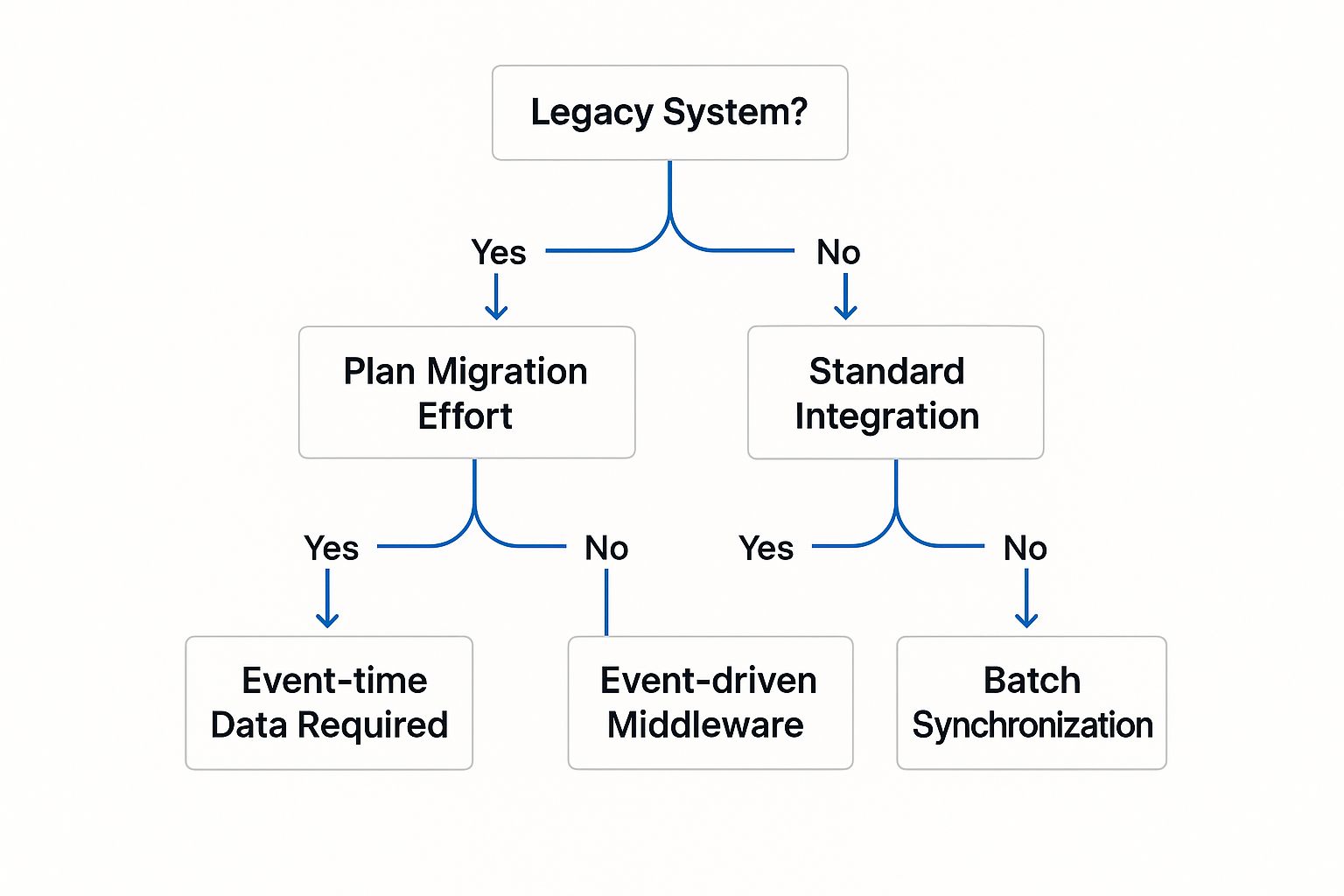
As the infographic shows, two major factors often drive the decision: whether you’re dealing with a legacy system and how critical real-time data is to your operations.
It all comes down to balancing the short-term setup effort against the long-term operational payoff. A manual process might feel like a quick win now, but it’s a solution that creates more problems than it solves later. An API integration is an investment in a smarter, more efficient future for your HR processes.
Getting Down to the Technical Build

Alright, with your blueprint and chosen approach locked in, it’s time to roll up your sleeves and get into the hands-on phase. This is where your strategy gets translated into code and becomes a functional reality. Be prepared, as the technical build is often the most resource-intensive part of the project, demanding careful management of your development team’s time and a sharp eye for detail.
This stage is all about the practical software integration steps that will create the bridge between your systems. But it’s about more than just plugging two applications together. You’re building a reliable, secure, and efficient data pipeline that will genuinely support your human resources team and their daily workflows.
Configuring API Endpoints
The first real coding task is to configure the API endpoints. You can think of an API endpoint as a specific “door” that lets your HRIS/ATS talk to SpringVerify. Your developers will need to dive into the API documentation for both platforms to understand exactly what data can be sent and received.
A common hurdle I’ve seen here is that API documentation isn’t always perfect. Sometimes it’s outdated, or it might be missing a few key details. My advice? Start with a simple, low-stakes API call—like fetching a list of existing verification checks—just to confirm the connection is solid before you tackle more complex actions.
Implementing Secure Authentication
Security is absolutely non-negotiable. You’re handling highly sensitive candidate data, so the connection between your systems has to be completely locked down. Modern integrations almost always rely on protocols like OAuth 2.0, which is the industry standard for secure authorisation.
This protocol allows your HRIS to access data in SpringVerify on your behalf without ever sharing your direct login credentials. It’s like giving a valet a key that only starts the car and parks it, not one that opens the glove box or the boot. Nailing the setup here ensures that all data transfer is encrypted and that access is strictly controlled.
The strength of your integration is defined by its security. A data breach from a poorly secured API can have severe consequences, making robust authentication a top priority, not an afterthought.
Mapping Data Fields Meticulously
Once the connection is secure, the next critical step is data mapping. This is the process of telling the integration exactly which field in your ATS corresponds to which field in SpringVerify. For instance, you’ll need to map the candidate name field in your ATS to the equivalent field in the SpringVerify API.
This sounds straightforward, but it requires extreme attention to detail.
- Look for inconsistencies: Is the “Phone Number” field in your ATS formatted the same way SpringVerify expects it? Think about country codes or special characters.
- Handle custom fields: Does your organisation use custom fields for unique data points? You have to make sure these are mapped correctly too.
- Establish a source of truth: Decide which system—your ATS or SpringVerify—will be the master record for specific data points to avoid conflicts and confusion down the line.
Overlooking even a minor detail here can lead to data integrity issues, failed background checks, or hours of frustrating manual clean-up work later.
Testing the Integration Thoroughly
Finally, before you even think about going live, you must test everything. Rigorously. When you’re in the middle of the technical build, knowing how to write integration tests is crucial for ensuring the whole system works together as one. These tests simulate real-world scenarios to confirm the integration behaves exactly as you expect.
For example, you’d run a test to see what happens when a new candidate is added, when a background check is successfully completed, and, just as importantly, what happens if an API call fails. A well-tested integration is a resilient one that you can trust to perform reliably day in and day out.
Safeguarding Data Quality and Integrity
An integration is only as good as the data flowing through it. You can build the most technically flawless bridge between your systems, but it’s all for nothing if it’s pushing incorrect, incomplete, or duplicate information back and forth. This is exactly why getting a handle on data governance is one of the most crucial parts of any successful integration.
Your first job is to establish a single source of truth for every critical piece of information. For instance, a candidate’s status should always be owned by your ATS. When that status flips to “Background Check Initiated,” your integration can trigger the action in SpringVerify, but the ATS must remain the undisputed master record. This simple rule prevents the confusing data clashes that can completely derail hiring workflows.
Implementing Proactive Data Checks
Don’t wait for data problems to show up unannounced. You need to build automated quality checks right into your integration from day one. This means setting up validation rules within your integration logic.
A simple example? Configure a rule to check if a phone number field contains exactly ten digits before sending it to SpringVerify. Or, make sure an email address actually looks like an email address. If the data fails the check, the system should flag it for a human to review instead of just passing garbage along. These small, upfront checks save you from countless downstream errors and headaches.
This isn’t just a “nice-to-have”; it’s standard practice for successful projects in India. In fact, a study on Indian system integrators found that poor data quality was a factor in nearly 40% of integration project delays.
I’ve seen it happen too many times: teams assume the data in their source system is clean. My advice? Always validate, always cleanse, and always set up alerts for weird anomalies. Catching one bad data entry before it corrupts another system will save you hours of painful troubleshooting later.
The Non-Negotiable Sandbox Environment
Before your integration even gets a sniff of live candidate or employee data, it must be put through its paces in a sandbox environment. A sandbox is just a secure, isolated copy of your production setup where you can test everything without any real-world consequences.
This is where you really try to break things. What happens if you sync 500 new candidates at once? How does the integration react to a temporary API outage? A sandbox lets you simulate these real-world scenarios to find and squash stability and performance bugs before they have a chance to impact your HR team.
Think of it as the final dress rehearsal before opening night. Your testing checklist should cover:
- Data Validation: Are all data fields mapping and syncing correctly between systems?
- Error Handling: Does the integration handle API errors and connection drops gracefully, or does it fall over?
- Performance Testing: How does it hold up under a heavy, high-volume load?
- Security Audits: Is all data transfer properly encrypted? Are the authentication protocols working as they should?
Protecting data integrity also means sticking to rigorous standards and ensuring your processes align with data protection regulations. This is a foundational part of any system design. You can learn more about how to maintain the highest standards of compliance in your HR operations in our guide. This groundwork in data governance and testing is what turns a merely functional integration into a truly reliable and trustworthy system for your organisation.
Managing a Smooth Launch and Beyond

Hitting that “go-live” button feels like a huge win, and it is. But in reality, it’s not the finish line. It’s the starting pistol for a new race: delivering real, sustained value to your organisation. The true work begins now, focusing on a smooth rollout for your teams, diligent monitoring, and smart long-term management of your new integration.
To sidestep the chaos of a “big bang” launch, I always recommend a phased deployment. Instead of flipping the switch for everyone at once, why not roll out the integration to a small, hand-picked group of users first? This approach dramatically shrinks the blast radius of any unexpected hiccups, giving you a chance to gather precious feedback and iron out kinks in a controlled setting before it goes company-wide.
Nail User Acceptance and Create Clear Documentation
Before any full rollout, getting your HR team involved in User Acceptance Testing (UAT) is non-negotiable. These are the people who will live in the system day in and day out. Their sign-off is your confirmation that the integration actually solves their real-world problems and doesn’t just look good on paper. They’ll spot workflow frictions that a developer, looking purely at the code, might easily miss.
Once UAT gives you the green light, it’s time to arm your team with clear, concise documentation.
- End-User Guides: Think simple, practical how-to’s for your HR team. These should clearly explain how the new automated workflow fits into their existing ATS.
- Support Protocol: You need a crystal-clear process for who to call when something goes wrong. This simple step prevents frantic emails and ensures issues get to the right people, fast.
A truly successful integration is one that users actually feel confident using. Don’t underestimate the power of documentation and a well-defined support plan—they’re just as critical as the code itself because they build trust and drive adoption.
Keep a Watchful Eye with Proactive Monitoring
Your integration is now live, but this isn’t a “set and forget” project. From day one, you need robust monitoring and logging systems in place. These tools are your eyes and ears, tracking the health of your API connections and logging every single request and response.
This kind of proactive oversight lets you spot trouble—like a sudden spike in API errors or sluggish response times—long before it impacts your users. By setting up automated alerts for these anomalies, your tech team can jump in and fix problems before your HR team even realises anything is amiss. This constant vigilance is what separates a merely functional integration from a truly reliable one that becomes an indispensable part of your toolkit for years to come.
Common Questions About HR Integrations
When you’re getting into the nuts and bolts of any technical project, questions are going to fly. The final stretch—from launching the integration to managing it long-term—always seems to bring up a fresh batch of queries. Let’s walk through some of the most common questions we hear from teams taking on this kind of project.
Getting straight answers helps take the mystery out of the process. More importantly, it gives your team the confidence to push forward, turning any lingering uncertainty into a clear, actionable plan.
How Long Does an Integration Typically Take?
This is the classic “how long is a piece of string?” question, but I can give you some solid benchmarks from what I’ve seen. A straightforward, API-to-API connection between a modern ATS like Greenhouse and SpringVerify can often be up and running in a few weeks. The real wildcard here is complexity.
Several factors can stretch out your timeline:
- Legacy Systems: Trying to connect with older, on-premise HRIS platforms is a whole different ball game. If they have poor (or even non-existent) API documentation, you’re looking at significant custom development time.
- Data Complexity: If you need to map dozens of custom fields between systems or run complex data transformations, that will add to the build phase. A project that involves a major data cleanup before you can even start integrating can easily add weeks to the schedule.
- Resource Availability: A lot comes down to your development team’s availability and expertise. An experienced team can knock out a simple integration quickly, but a stretched or less experienced team will naturally take longer.
My best advice? Break the project down into smaller, manageable milestones. This approach makes the timeline feel less overwhelming and, crucially, lets you show progress and keep stakeholders happy along the way.
What Are the Biggest Hidden Costs to Watch Out For?
You’ve probably budgeted for the initial development work, but some costs have a knack for popping up unexpectedly. The biggest one I’ve seen trip people up is ongoing maintenance.
An integration isn’t a “set it and forget it” task. APIs get updated, your other systems will change, and bugs will inevitably need squashing. Factoring in a maintenance budget right from the get-go is absolutely critical.
Another hidden cost is inadequate training. This one hurts. If your HR team doesn’t truly understand how to use the new automated workflow, they’ll just fall back on their old manual processes. When that happens, you’ve completely undermined the project’s ROI. Proper documentation and hands-on training sessions always pay for themselves.
Finally, never underestimate the cost of poor data quality. If your source systems are a mess of errors and duplicates, you’ll burn a huge amount of time and money on data cleansing, either before or after the integration. It’s almost always cheaper to tackle this proactively.
Ready to build a seamless connection between your HR tools? SpringVerify provides a powerful, well-documented API that makes integrating with your existing ATS or HRIS platforms straightforward and secure. Discover our API integration solutions and start automating your background verification workflow today.


