

Online driving licence verification is just what it sounds like: a straightforward way to confirm a licence is authentic and currently valid using official government portals. This digital check has become absolutely essential for employers, insurance companies, and even individuals. It’s the fastest and most accurate way to verify credentials, helping to prevent fraud, stay compliant, and keep our roads safer.
Table of Contents
Why Online Driving Licence Verification Matters

Gone are the days of manual checks and painful, time-consuming visits to the Regional Transport Office (RTO). Today, checking a driving licence online is a vital tool for sidestepping some serious risks. For any business, hiring a driver with a fake or invalid licence isn’t just a simple mistake—it’s a massive liability.
Think about a delivery company that hires a driver without doing their homework. If that driver gets into an accident, the company could be staring down severe legal trouble, hefty financial penalties, and a serious blow to its reputation. Proper background checks aren’t just about ticking a box; they’re fundamental to running a safe and responsible operation.
The Staggering Reality of Licence Fraud
The scale of this problem in India is genuinely alarming. Out of over 250 million active driving licences, government data has revealed a shocking statistic: roughly 30% of them could be fake.
That suggests somewhere around 75 million drivers might be on the road with bogus credentials, posing a direct and constant threat to public safety.
This isn’t a victimless problem. This kind of widespread fraud has tangible consequences for everyone:
- Rejected Insurance Claims: An insurer has every right to deny a claim if an accident involves a driver with a fraudulent licence.
- Legal Liabilities for Employers: Companies are held responsible for what their employees do on the clock, which makes thorough verification a non-negotiable.
- Compromised Road Safety: Untrained or unauthorised drivers are a major factor in road accidents and fatalities.
Verifying a driver’s licence is more than a procedural step; it’s a critical safety measure that protects your business, your assets, and the public. An invalid licence can invalidate insurance and open the door to immense legal exposure.
The Power of Instant Confirmation
This is exactly where platforms like Parivahan Sewa become indispensable. They offer a reliable and immediate solution, giving you the power to confirm a licence’s authenticity in minutes.
Whether you’re an HR manager running a background check, an individual buying a used car, or a fleet owner managing a team of drivers, online verification provides the certainty you need. It’s an essential step in building trust and ensuring everyone on the road is actually qualified to be there.
For businesses, keeping meticulous records is also a core part of staying compliant with transport regulations. It’s always a good idea to explore more about ensuring your verification processes meet compliance standards to further protect your operations.
What You Need Before You Start the Verification
Before you jump into an online driving licence verification, a little prep work can make all the difference. Think of it like gathering your ingredients before you start cooking—it just makes the whole process smoother. You really only need two key pieces of information from the physical driving licence.
Having these details ready to go will help you avoid the common frustration of seeing a ‘record not found’ error. The process itself is quick, but it’s completely unforgiving when it comes to accuracy.
Key Information Required
The two absolute must-haves are the Driving Licence (DL) number and the holder’s date of birth. You’ll find both clearly printed on the front of any Indian driving licence, whether it’s a newer smart card or one of the older laminated booklets.
- Driving Licence Number: This is a unique alphanumeric code. On the smart card versions, it’s usually labelled “DL No.” and is pretty hard to miss. If you’re looking at an older book-style licence, you’ll typically spot it near the top.
- Date of Birth (DOB): This is almost always located right below the licence holder’s name and address. Make sure you enter it in the DD-MM-YYYY format, as that’s what the verification portals expect.
A classic mistake is mixing up similar-looking characters. I’ve seen it countless times—people confuse the number ‘0’ with the letter ‘O’, or ‘1’ with ‘I’. A quick double-check before you even start can save you a world of trouble.
Remember, the format of the DL number changes from state to state. It usually kicks off with a two-letter state code (like ‘MH’ for Maharashtra or ‘DL’ for Delhi), followed by the RTO code and a unique number. It’s crucial to enter it all as one continuous string, without any spaces or special characters.
Getting this simple pre-check right is fundamental. It’s a lot like basic identity verification for employment, where accuracy is everything if you want a reliable result. Taking that extra moment to confirm the details ensures your online driving licence verification works on the first try, giving you the confirmation you need without any unnecessary delays.
How to Use Parivahan for Licence Verification
When you need an official, rock-solid method for checking a driving licence online, the Parivahan Sewa portal is the place to go. Managed by the Ministry of Road Transport & Highways, it’s essentially the master database for every driving licence and vehicle registration in the country. Using it is pretty straightforward, once you know the lay of the land.
Let’s walk through the process together, from finding the right page to making sense of the final report. The idea isn’t just to get a thumbs-up or thumbs-down on the licence’s validity; it’s about seeing the complete picture.
Navigating to the Right Section
The Parivahan website is a busy place with a ton of different services, so the first trick is knowing exactly where to click. It might look a little cluttered at first, but the path is actually quite direct.
Once you’re on the homepage, find the “Online Services” tab in the main menu. Hover over it, and a dropdown will appear. The option you’re looking for is “Driving Licence Related Services”. Clicking this takes you to a new page where you’ll need to select the state that issued the licence.
After you pick the state, the site will redirect you to that region’s specific Sarathi portal. From there, look for a menu item labelled “DL Search” or something similar. That’s your destination.
Entering the Licence Details Correctly
The DL Search page has a simple form asking for two main things: the Driving Licence number and the person’s date of birth. This is where having that accurate information ready really pays off.
- Driving Licence No: Type in the DL number exactly as it’s printed on the card. Make sure to include the state and RTO codes, but don’t add any spaces or special characters.
- Date of Birth: Enter the date of birth using the DD-MM-YYYY format.
- Verification Code: You’ll see a captcha code on the screen. Just type it into the box to prove you’re human.
With all the details filled in, hit the “Check Status” button. If the information matches a record in the national register, the system will pull up the licence details instantly.
Understanding the Verification Results
The results page is where you get the real value. It’s not just a simple confirmation; it’s a detailed report giving you a full snapshot of the licence holder’s credentials.
This is a general overview of the process for manual checks on the government portal.
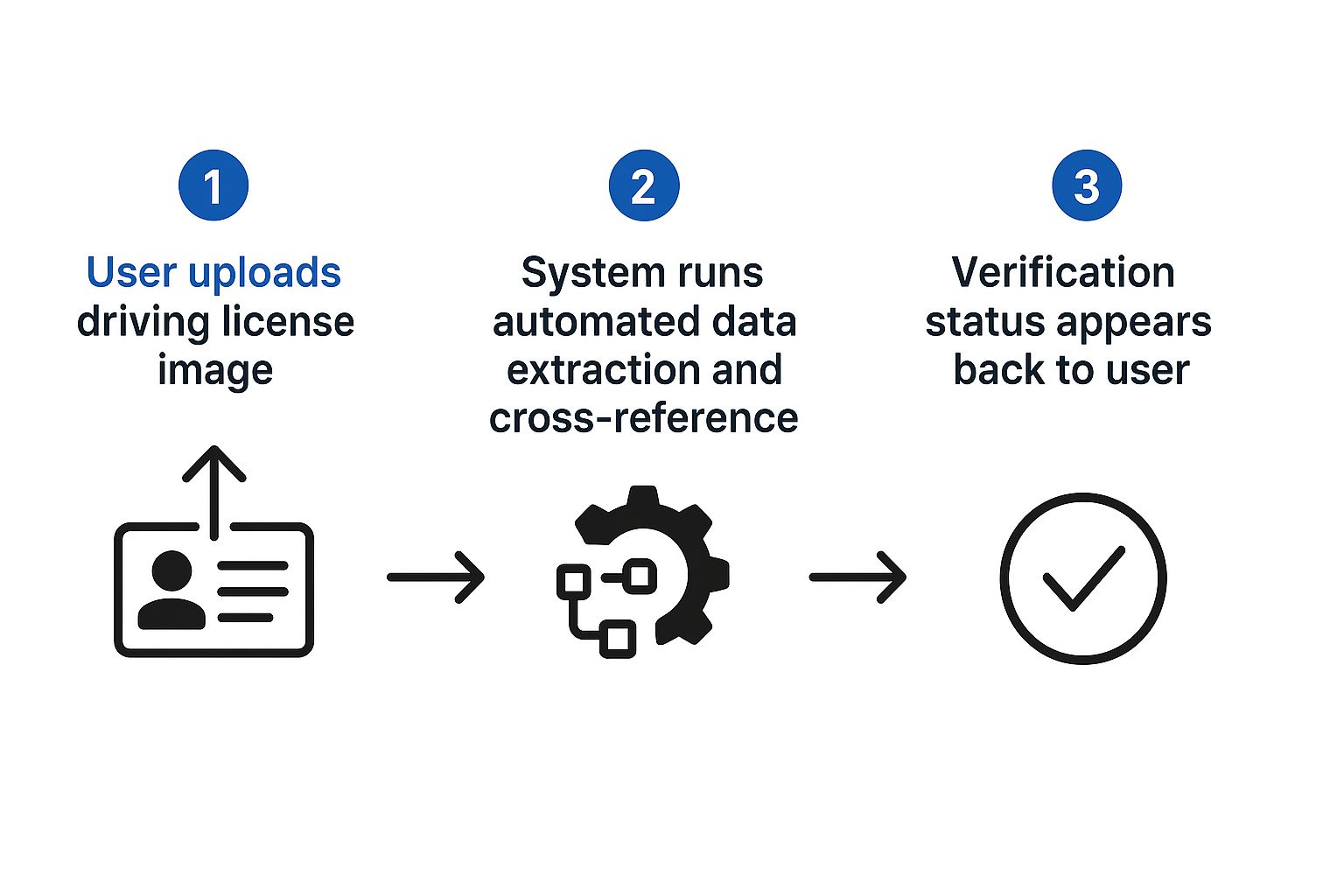
The visual above gives you an idea of how automated systems can do the same thing, just much, much faster by pulling and cross-referencing data in a flash.
Here’s what you should pay close attention to on the results page:
- Holder’s Name: First things first, confirm it’s the right person.
- Current Status: This is the most important bit. It will clearly state if the licence is “ACTIVE”, “BLOCKED”, or “EXPIRED”.
- Validity Details: This section shows the date the licence was issued and, crucially, the expiry dates for different types of vehicles.
- Class of Vehicle (COV) Details: This breaks down exactly what the person is legally allowed to drive (like MCWG for Motorcycle With Gear, or LMV for Light Motor Vehicle).
The details page is your single source of truth. Scrutinise the ‘Current Status’ and the ‘Class of Vehicle’ sections carefully. An active status for a two-wheeler licence doesn’t mean the person is authorised to drive a car.
For any business doing these checks regularly, typing in details one by one can become a real drag. To speed things up, many companies look into API integrations for background checks, which can automate the entire verification process right inside their existing HR software. This approach cuts down on manual work and reduces the chances of human error, leading to a much smoother and faster hiring process.
Digging Deeper with State Transport Websites
While the national Parivahan portal is fantastic for a quick, country-wide check, sometimes you need to get more granular. This is where the individual State Transport Department websites come into play. Think of them as a specialised tool for when you need localised details or a reliable backup plan.
Most states run their own dedicated portals. While they sync with the national database, they often have a different user interface and can occasionally offer extra information. For example, if you’re verifying a licence from Maharashtra or Tamil Nadu, going straight to their transport sites might give you results that align better with that region’s specific record-keeping format.
This approach is a real lifesaver if the main Parivahan portal is down for maintenance or bogged down with heavy traffic. Having an alternative means you can get your verification done without any frustrating delays.
When a State-Specific Search Makes Sense
So, when should you head to a state portal instead of the national one? It’s a practical move in a few key scenarios. You might find a state website updates its own records faster for minor things, like a change of address within the state, before that information makes its way to the national server.
Some state portals also provide context-specific details you won’t find on Parivahan. This could include information on local RTO endorsements or specific challans (traffic fines) tied to the licence only within that state’s jurisdiction. It offers a much finer level of detail that can be critical for certain checks.
- System Outages: The Parivahan site can be unavailable. State websites provide a solid plan B.
- Localised Data: You might be hunting for information specific to a particular RTO’s records, which is often easier to find on the state portal.
- Interface Preference: Let’s be honest, some users just find their local state’s website simpler and more intuitive to use than the national one.
Key Differences in Verification Platforms
It helps to see how these two options stack up. Neither is inherently “better”—the right choice just depends on what you need to find at that moment. Here’s a quick breakdown to help you decide which route to take.
| Feature | Parivahan Sewa (National Portal) | State Transport Website |
|---|---|---|
| Data Scope | Comprehensive, all-India database | Focused on state-specific records |
| Reliability | Generally high, but can face downtime | Often a stable and reliable alternative |
| User Interface | Standardised across all states | Varies significantly from state to state |
| Specific Details | Excellent for interstate verification | May offer more granular local data |
As you can see, each has its strengths. The national portal gives you the big picture, while the state site lets you zoom in on the finer details.
Going directly to a state website isn’t about replacing Parivahan; it’s about adding another tool to your verification toolkit. For a business verifying licences from a single state, using the local portal can sometimes be a more direct and efficient process.
Knowing how to use both national and state-level resources gives you the flexibility to get the job done, no matter what. This two-pronged approach makes any verification process more robust and ensures you can always find the information you need.
Figuring Out Common Verification Errors and Glitches
Hitting a roadblock during an online driving licence check is more common than you might think. But it’s rarely a dead end. Usually, a bit of quick troubleshooting is all it takes to get things moving again. Knowing what these error messages actually mean is the first step to fixing them fast.
Instead of getting frustrated, it’s better to see these errors as signposts pointing you toward the problem. Most of the time, the issue is something simple, like a data entry mistake or a misunderstanding of what the licence status really implies. With the right approach, you can turn a confusing error into a solved problem in just a few minutes.
The ‘Details Not Found’ Dilemma
This is, without a doubt, the most frequent error you’ll encounter. And 99% of the time, it’s just a simple typo. Before you jump to conclusions about the licence being fake, go back and meticulously double-check every piece of information you’ve entered. A single wrong digit or a misplaced character is enough to stop the system from finding a match.
It’s surprisingly easy to mix up similar characters, especially if you’re working from a worn-out or poorly printed licence card. The usual suspects are:
- ‘O’ (the letter) vs. ‘0’ (the number): This is a classic mix-up that trips people up constantly.
- ‘I’ (the letter) vs. ‘1’ (the number): Another very common mistake that can throw off the whole search.
- Incorrect Date of Birth Format: Make sure you’re using the DD-MM-YYYY format that the portal requires.
If you’ve confirmed all the details are perfect and you’re still getting the error, there’s a small chance the record hasn’t been fully digitised yet. This can happen with very old licences. In this rare scenario, the licence holder will need to get in touch with their local RTO to sort it out.
What Do These Licence Status Messages Mean?
Sometimes, you won’t get an outright error but a status message that needs a bit of clarification. These aren’t failures; they’re crucial pieces of information about the licence’s current standing.
A verification result isn’t just a “pass” or “fail.” Understanding a status like ‘Blocked’ or ‘Expired’ is vital for making an informed decision, whether you’re hiring a driver or validating a document for a transaction.
Here’s a quick rundown of what the key statuses mean:
- Expired: This one is pretty straightforward. The licence is no longer valid for driving, and the person needs to get it renewed.
- Blocked: This status is much more serious. It means the RTO has suspended or revoked the licence, usually because of serious traffic violations, legal problems, or other infringements.
- Inactive: You might see this if a licence hasn’t been renewed long after its expiry date or if there’s some kind of administrative hiccup with the record.
If you come across a ‘Blocked’ status, treat it as a major red flag. This requires an immediate conversation with the licence holder, as they’ll need to resolve whatever the underlying issue is with their RTO. Don’t just brush it off—it means the person is not legally allowed to be on the road.
The Rise of Smart Cards and QR Code Verification
The future of licence verification is already here, and it’s built to be instant and foolproof. We’re finally seeing a move away from those flimsy, laminated documents—which are notoriously easy to damage and forge—towards far more secure, tech-savvy smart driving licences.
This shift is a massive step forward for both road safety and document authenticity.
These modern licences come embedded with microchips and feature a prominent QR code, completely changing how checks are done. Instead of a traffic officer squinting at a faded photo, an online driving licence verification can now be done with a quick scan.
How Smart Technology Works
The chip and QR code on a smart licence hold all the driver’s key information in an encrypted format. When an authorised official scans it, the data is instantly checked against the central government database in real-time. This creates a secure, closed-loop system that is incredibly difficult for fraudsters to breach.
The benefits are pretty clear:
- Near-Impossible Forgery: Trying to duplicate an encrypted chip and fake a record in the national database is practically impossible.
- Instantaneous Checks: What used to be a manual inspection now takes seconds. This speeds up everything from routine traffic stops to background checks for jobs.
- Reduced Paperwork: Going digital cuts down on the administrative headache for both licence holders and government agencies.
This isn’t just about making things more convenient. It’s a powerful tool for improving road safety. By ensuring every licence is securely tied to a central database, it gets much harder for suspended or unauthorised drivers to stay on the road.
The government’s phased rollout of these smart driving licences across India is a major milestone in tackling fraud. These new cards, with their QR codes and chips, make them incredibly difficult to forge. Both new applicants and people renewing their licences are getting these smart DLs, which allow for immediate, real-time verification and drastically reduce the fake documents that were common with the old paper versions.
You can learn more about the new driving licence rules in India and see how they are reshaping the entire verification landscape.
Common Questions on Driving Licence Checks
Got a few lingering questions about checking a driving licence online in India? Let’s clear them up with some quick, straightforward answers.
First off, you might be wondering about the cost. Good news: verifying a licence through official government portals like Parivahan Sewa or state-specific transport websites is completely free. These platforms were built for public use, so anyone can check a licence’s status without paying a rupee.
It’s also 100% legal. In fact, it’s an encouraged practice, especially for employers doing background checks or even for individuals who are buying or selling a used car.
Is the Verification Process Instant?
Yes, for the most part. Once you pop in the DL number and the driver’s date of birth, the system queries the national database and spits out the details in seconds. This real-time access is a huge leap forward from the slow, manual methods of the past.
Just keep one thing in mind: the information you see is only as current as the database itself. While major changes like a renewal or suspension usually show up fast, minor administrative updates might take a little longer to appear.
Can I Check a Licence from Any State?
Absolutely. The Parivahan Sewa portal is a brilliant centralised system that pulls data from RTOs across every single state and union territory in India. This makes it the perfect one-stop shop for verifying a licence, no matter where it was issued.
This national integration is a game-changer. It means a licence issued in Kerala can be instantly and reliably verified by an employer in Delhi. It creates a single, consistent standard for verification across the entire country.
This seamless access is also a great tool against fraud. It stops people from trying to use a licence from another state to hide a bad record, ensuring that a single online driving licence verification gives you the full, accurate picture every time.
For a faster, more reliable way to manage background checks, SpringVerify offers automated verification solutions that integrate directly with your hiring workflow. Discover how we can streamline your process at https://in.springverify.com.


