

Verifying an Aadhaar number is a pretty straightforward way to confirm its authenticity. You can either do it yourself through the official UIDAI portal or, for more streamlined business use, integrate a secure API.
This check simply confirms that the 12-digit number is genuine and active. It also provides a few basic, non-sensitive details like an age band, gender, and state, which is just enough to verify you’re dealing with a real person without revealing private information.
Table of Contents
Why Aadhaar Validation Is Essential
Before we get into the “how,” it’s worth taking a moment to understand the “why.” In India, Aadhaar validation has become a fundamental part of building digital trust. It isn’t just a technical tick-box exercise; it’s a practical safeguard that prevents fraud and ensures compliance in countless everyday situations.
Think about it in real-world terms. For a landlord, it’s about confirming a potential tenant’s identity before handing over the keys. For a business, it’s a crucial step in verifying a new hire’s credentials to keep the workplace secure.
Aadhaar validation is often the first step in more comprehensive identity checks, like the pre-employment screening companies conduct for new hires. This simple check acts as a first line of defence against someone misrepresenting who they are.
The official UIDAI portal is the main public-facing tool for these checks, and it’s accessible to anyone.
The screenshot above shows the UIDAI homepage, pointing you toward the “My Aadhaar” section. This is your gateway to all sorts of services, including the option to verify an Aadhaar number. The portal really highlights the government’s push to make these tools easy for everyone to use, putting identity management in one central place.
The Growing Importance of Digital Verification
Aadhaar has woven itself into the fabric of daily life on a massive scale. One of the clearest signs of this is the boom in biometric verification methods.
According to the Ministry of Electronics and Information Technology (MeitY), Aadhaar face authentication transactions hit a staggering 2 billion by mid-2025. That number alone shows just how widely digital identity checks have been adopted across the nation. You can read more about this explosive growth in this report on Aadhaar usage.
This massive adoption makes one thing clear: knowing how to validate an Aadhaar is no longer just a nice-to-have skill, it’s essential. It’s also important to know the difference between simple verification and the more robust process of authentication:
- Verification: This just confirms if an Aadhaar number is valid and active. It’s a basic check that doesn’t need OTPs or biometrics.
- Authentication: This is a much more secure process. It uses OTPs sent to the registered mobile number or biometric data (like fingerprints or an iris scan) to confirm the identity of the person holding the Aadhaar.
By mastering the simple act of validation, you empower yourself to operate more securely in a digitally connected economy. It’s the foundational skill needed to responsibly handle identity information and protect against potential risks.
Ultimately, knowing how to validate an Aadhaar number is about more than just checking a box. It’s about participating in a system of trust that secures financial transactions, employment, and access to critical services for millions of people every single day.
Verifying Aadhaar Through the UIDAI Portal
The most straightforward way to check an Aadhaar number is by going directly to the source: the official portal run by the Unique Identification Authority of India (UIDAI). It’s a free, public service that lets anyone do a quick check to see if a number is real and active.
Think of it as a first-line-of-defence check. Whether you’re a landlord vetting a potential tenant or a small business owner confirming a new hire’s details, knowing how to do this is a fundamental skill.
First things first, you need to find your way through the UIDAI website. It’s packed with different services, but you’ll want to head over to the “My Aadhaar” section and look for the tool specifically labelled ‘Verify Aadhaar Number’. That’s your starting point.
Once you’re on the right page, it’s a simple two-step dance. You’ll be asked for the 12-digit Aadhaar number and a security captcha. That captcha is case-sensitive, so typing it carefully will save you the headache of having to do it all over again.
Navigating the Verification Process
When you’re entering the details, precision is key. A single wrong digit in the Aadhaar number will cause the check to fail, even if the original number is perfectly valid. It’s always a good idea to double-check the 12 digits before you hit proceed.
The captcha can also be a bit of a pain to read sometimes. If you can’t make it out, don’t guess—just use the refresh button to get a new one. A few extra seconds here is better than multiple failed attempts. Once both fields are filled in correctly, click the ‘Proceed and Verify Aadhaar’ button.
Here’s a look at what the online check on the UIDAI website actually looks like:
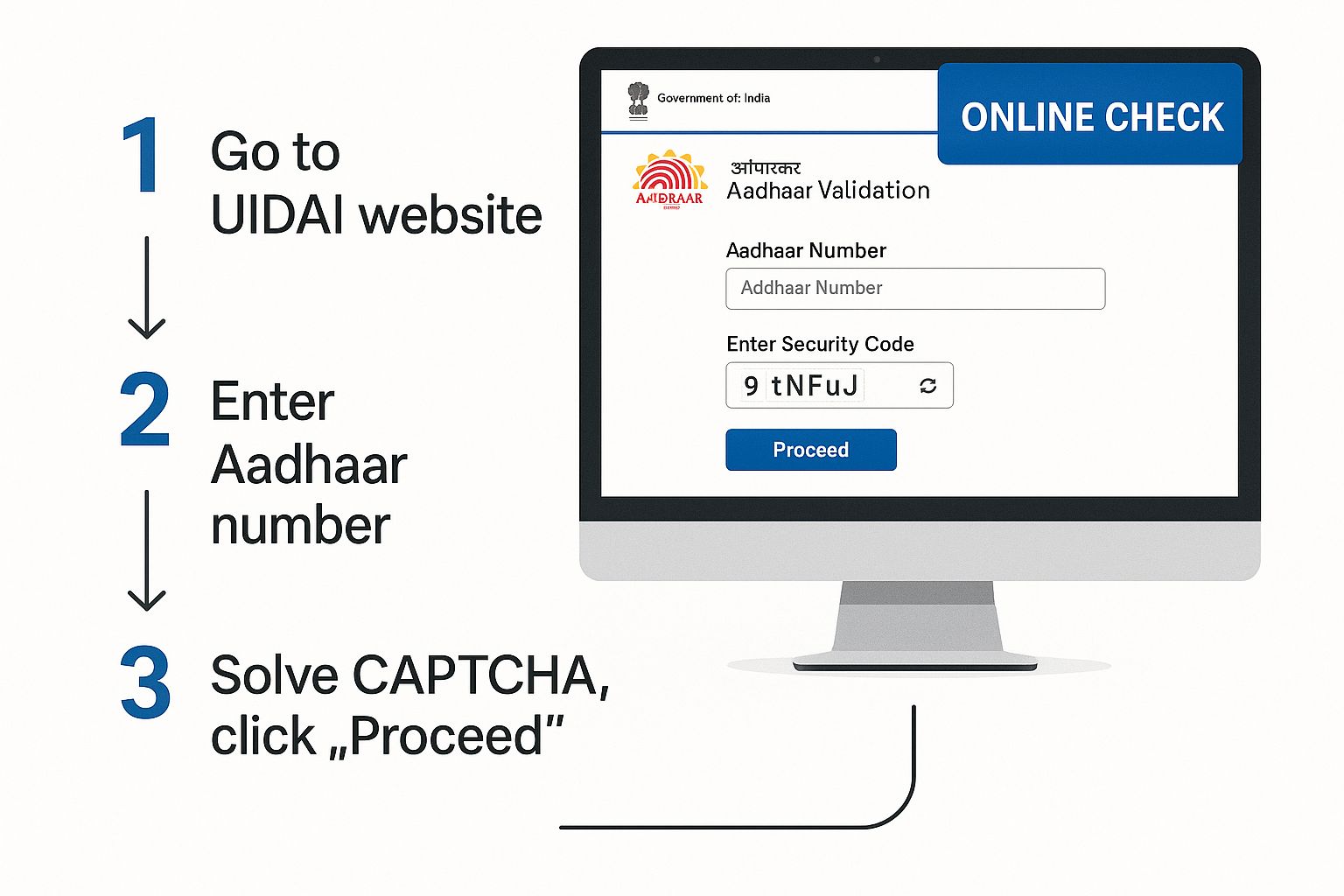
As you can see, it clearly highlights the fields you need to fill out, making the process pretty hard to mess up.
Understanding the Verification Results
If everything checks out, the portal will immediately show a confirmation screen. Now, it’s important to understand what this confirmation is—and what it isn’t. It’s a simple status update, not a full KYC document. The amount of information it gives you is limited on purpose to protect the cardholder’s privacy.
Here’s what you can expect to see:
- Aadhaar Number Existence: A simple message confirming the number is in the database.
- Age Band: You’ll see an age range (like 20-30 years), not the person’s exact date of birth.
- Gender: The registered gender of the individual.
- State: The state where the Aadhaar was first issued.
This limited information is a deliberate security measure. It gives you just enough to confirm an identity is legitimate without exposing sensitive personal data like their full name, address, or mobile number.
But what if the validation fails? A failure message usually points to one of two issues: you either typed the Aadhaar number wrong, or the number doesn’t exist in the UIDAI database. Your first move should always be to go back and carefully re-enter the details.
If it fails a second time, the number itself might be invalid. For industries that need to run these checks often and reliably, like those discussed in our guide on identity verification for technology companies, this manual method just doesn’t scale. Automation becomes the only practical solution. For a one-off check, though, this portal is an excellent tool.
Automating Aadhaar Checks with APIs
While the UIDAI portal is handy for the odd, one-off check, it quickly becomes a bottleneck for any business that needs to verify identities at scale.
Imagine you’re onboarding dozens of new employees or verifying hundreds of gig workers every single day. Manually punching in each Aadhaar number isn’t just slow; it’s a recipe for human error and is simply not a practical way to operate.
This is where Application Programming Interfaces (APIs) come into the picture. Think of an API as a secure messenger between your software and a verification service. It lets you automate the whole process. Instead of a person typing numbers into a website, your application sends an automated request and gets a clean, structured response back in milliseconds.
The payoff is immediate and massive. Automation kills manual data entry, which drastically cuts down on mistakes and frees up your team to focus on work that actually matters. The result is faster onboarding, quicker customer verification, and a much smoother workflow all around.
The Power of API Integration
Integrating an Aadhaar validation API means you can build identity checks directly into the platforms you already use—whether that’s an HR management system, a customer onboarding app, or a loan application portal. This creates a seamless, invisible experience for your users and your internal teams.
A perfect real-world example is a fintech company processing loan applications. When a user submits their Aadhaar, the system can instantly ping a verification API behind the scenes.
- API Call: The platform sends the 12-digit Aadhaar number to the verification service’s endpoint.
- Processing: The service validates the number against the official database in real-time.
- JSON Response: The API returns a simple, machine-readable response, usually in JSON format. This confirms the number’s validity and can provide basic, anonymised details like age band and state.
This entire sequence can happen in less than a second, allowing the application to move to the next step without any manual hold-ups. For companies where speed and accuracy are everything, this is a genuine game-changer. You can find out more about how services like SpringVerify provide powerful and easy-to-use API integrations for background checks to achieve this level of efficiency.
The core value of an API is turning a repetitive, manual task into an instant, automated function that scales with your business. It transforms identity verification from a potential obstacle into a seamless part of your process.
Manual UIDAI Portal vs API Validation
To help you decide which approach fits your needs, here’s a side-by-side look at the two main Aadhaar validation methods. This comparison should make it clear which path is right for your organisation’s scale and requirements.
| Feature | Manual UIDAI Portal | API Validation (e.g., SpringVerify) |
|---|---|---|
| Speed | Slow; requires manual data entry for each check. | Instantaneous; results are returned in milliseconds. |
| Scalability | Low; suitable only for a few checks per day. | High; can handle thousands or millions of verifications daily. |
| Error Rate | Prone to human error (typos). | Very low; automated process eliminates manual entry mistakes. |
| Integration | None; it’s a standalone website. | Seamless; integrates directly into your existing software/apps. |
| User Experience | Can be a clunky, multi-step process. | Smooth and invisible to the end-user. |
| Best For | Individuals, very small businesses, occasional use. | Businesses of all sizes needing to verify identities at scale. |
Ultimately, while the manual portal has its place, any business looking for efficiency and scale will find that an API-driven solution is the only sustainable choice.
Choosing a Compliant API Provider
When you decide to automate Aadhaar checks, picking the right API provider is critical. You’re handling sensitive information, so security and compliance are non-negotiable. An unreliable or non-compliant service could expose your business to serious legal and financial risks.
Your chosen provider must strictly follow UIDAI regulations and data protection laws. This means ensuring all data transmission is encrypted and that they have robust security measures in place to prevent breaches.
Furthermore, getting explicit user consent before performing any verification is a mandatory legal requirement that your API workflow must support. A reputable provider will have these safeguards built into their platform, offering a secure and trustworthy solution for your business.
Solving Common Aadhaar Validation Problems
Even with a system as widespread as Aadhaar, validation isn’t always a walk in the park. Knowing how to handle the common hiccups is key, especially when a failed check can stop someone from accessing essential services or finalising an important transaction.
From what I’ve seen, the problems usually boil down to two things: biometric failures and data mismatches.
Biometric issues can be particularly tricky. Imagine a manual labourer whose fingerprints have worn down from years of hard work, making it impossible for a scanner to get a clean read. It happens more often than you’d think. Similarly, an elderly person’s iris patterns can change slightly over time, leading to an authentication failure. When these physical traits don’t match the data on file, the system simply says no.

This isn’t just a minor tech glitch; it has serious real-world consequences. The Public Accounts Committee (PAC) of the Indian Parliament has pointed out that high failure rates in Aadhaar biometrics are a major roadblock, often excluding eligible people from critical welfare schemes. This really underscores why having effective workarounds is so important. You can read more about these challenges with Aadhaar verification.
Finding Practical Solutions
When a biometric check fails, the first thing to remember is not to panic. The system is actually built with backups for this exact reason. If a fingerprint scan doesn’t work, an iris scan might. If both fail, there’s always the OTP sent to their registered mobile number.
Here are a few practical steps you can take or advise someone to try:
- Try Alternative Biometrics: If fingerprints are the problem, suggest an iris scan if the device supports it.
- Use OTP Authentication: This is the most reliable fallback. Just make sure the person’s current mobile number is correctly linked to their Aadhaar.
- Clean the Scanner and Fingers: It sounds basic, but sometimes a bit of dirt, dust, or moisture is all it takes to cause an error. A quick wipe can often solve the problem instantly.
Database errors are another beast entirely. Sometimes, an Aadhaar number gets incorrectly marked as inactive, or in rare cases, duplicate entries might exist in the system. Another common issue is the delay in deactivating the Aadhaar of deceased individuals, which can create a whole lot of administrative headaches for their families.
The key takeaway is to remain patient and methodical. A failed validation is often a solvable problem, not a dead end. Guiding someone to update their demographic or biometric data at an Aadhaar Seva Kendra is the ultimate solution for persistent issues.
In the long run, the best strategy is to encourage people to keep their Aadhaar details—especially their mobile number and biometrics—up to date. UIDAI actually recommends a periodic update every 10 years. This helps ensure the data remains accurate and reliable, making future validation attempts far more likely to sail through on the first try.
Secure and Compliant Aadhaar Validation Practices
Handling Aadhaar data isn’t just another technical task on your checklist; it’s a serious legal and ethical responsibility. Before you even think about the how of validating an Aadhaar number, your first and most critical step is securing explicit consent from the individual. This isn’t just good practice—it’s a legal requirement you absolutely cannot ignore.
You have to be crystal clear about why you need to verify their Aadhaar and get their permission before you proceed. Skipping this can lead to some hefty penalties and, just as importantly, a total breakdown of trust.
Upholding Data Privacy
Once you have consent, your focus immediately shifts to protecting that data. A core rule to live by is to never store Aadhaar numbers unless you are legally required and officially permitted to do so. Hoarding data you don’t need just creates unnecessary risk, turning your systems into a potential goldmine for breaches.
Think of Aadhaar data as a temporary key, not a permanent file. Use it for the immediate purpose of verification, and then let it go. This principle, known as data minimisation, is central to handling information responsibly and helps you steer clear of privacy regulation minefields.
The bottom line is simple: collect only what you need, use it for its intended purpose with full consent, and don’t hang onto it afterwards. This single approach drastically cuts down your compliance headaches and protects both your organisation and the individual.
The Unique Identification Authority of India (UIDAI) has laid out very clear guidelines on data usage. Any violations, like unauthorised sharing or improper storage, come with stiff penalties, including hefty fines and even imprisonment. To navigate these rules effectively, you can get a deeper understanding of data security compliance in India.
Ensuring Data Integrity and Security
The integrity of the Aadhaar system itself is another piece of the puzzle. Despite being so widely used, data quality issues do pop up. In fact, recent research has shown that Aadhaar enrolment has gone past 100% in some states, which points to potential problems like duplicate entries or over-enrolment. You can read more about this in the research on Aadhaar data quality.
What this tells us is that while the system is robust, it isn’t perfect. For any business, this just reinforces the need for diligent and secure validation practices. If you’re using an API for verification, for instance, it’s vital to use secure and encrypted channels.
- Always use HTTPS: Make sure every single API call is made over an encrypted connection. This prevents anyone from snooping on the data in transit.
- Secure API Keys: Treat your API credentials like you would your bank password. Store them securely and limit who has access.
- Audit Regularly: Periodically review who can access your verification systems and what checks are being run. It’s a simple but powerful security habit.
By embedding these secure and compliant practices into your daily workflow, you’re not just protecting sensitive data; you’re building a process that people can trust. This responsible approach lets you get all the benefits of Aadhaar validation without exposing your organisation to unnecessary legal and reputational risks.
Frequently Asked Questions About Aadhaar Validation
When you’re dealing with Aadhaar validation, a few questions tend to pop up again and again. Getting clear, straightforward answers is key to handling the process correctly, whether you’re a business owner or just verifying something for yourself. Let’s tackle some of the most common queries.
Is It Legal for Any Business to Validate an Aadhaar Number?
Yes, but this comes with a huge caveat: you must get explicit consent from the Aadhaar holder before you even think about running a check. Without their permission, you simply aren’t authorised to do it.
While the basic number validation on the UIDAI portal is generally fine for verification purposes (with consent, of course), things get much stricter if you need to perform authentication. If your business needs to authenticate someone using biometrics or an OTP, you have to be a registered KUA (KYC User Agency) or AUA (Authentication User Agency). Even just storing the Aadhaar number is heavily regulated and something you should avoid unless you have a specific legal mandate to do so.
The golden rule is always consent first. Skipping this step isn’t just bad practice; it’s a direct violation of UIDAI regulations and can land you in serious legal trouble. Understanding this distinction is fundamental to staying compliant.
What Should I Do If an Aadhaar Number Fails Validation?
A failed validation doesn’t automatically mean the number is fake or fraudulent. More often than not, it’s a simple human error.
The first thing to do is double-check the basics. Was the 12-digit number typed in correctly? It’s incredibly easy to transpose a couple of digits or make a typo. Also, take another shot at the security captcha—it’s case-sensitive and notoriously tricky to read.
If you’ve tried again and it still fails on the UIDAI portal, there might be a real issue. The Aadhaar could be invalid or may have been deactivated. In that case, your best bet is to advise the individual to check their Aadhaar status themselves on the official website or to visit an Aadhaar Seva Kendra for help. If you’re using a professional API service for validation, the response usually comes with an error code that can help you pinpoint the exact problem much faster.
Does Aadhaar Validation Reveal Personal Details like an Address?
Absolutely not. A standard Aadhaar validation is not the same as a full KYC (Know Your Customer) check. The free service on the UIDAI portal was designed with privacy in mind and deliberately limits the data it shares.
When a number is successfully validated, the system only confirms that it’s active and gives you three very general pieces of information:
- An approximate age band (e.g., 20-30 years)
- The individual’s gender
- The state where the Aadhaar was issued
It will never show you a person’s name, exact date of birth, mobile number, or their residential address. Accessing that kind of sensitive information is restricted to regulated e-KYC services, which are only available to authorised agencies operating under a strict legal framework.
Ready to automate your identity verification and make hiring decisions with confidence? SpringVerify offers a powerful API that integrates seamlessly into your workflow, providing instant and secure Aadhaar validation at scale. Learn more and get started today!


