

To create effective standard operating procedures, you really only need a simple, structured approach. It boils down to a few core ideas: defining the process, drafting clear instructions, rolling them out to your team, and then refining the documents over time. Nailing this framework is what turns SOPs from a binder on a shelf into a practical tool that delivers consistent results.
Table of Contents
Why Effective SOPs Are Your Business’s Secret Weapon
Let’s be honest, Standard Operating Procedures (SOPs) have a reputation for being boring administrative paperwork. But in reality, they’re the blueprint for consistency, quality, and scalable growth in any organisation. Well-crafted SOPs aren’t just about ticking boxes; they solve real, everyday business challenges.
Imagine your team doubles in size. How do you maintain service quality? Or how do you ensure every new hire follows critical compliance steps for a background verification? Without a documented standard, you’re relying on memory and word-of-mouth, which is a recipe for errors and inconsistency.
Investing time in creating robust SOPs isn’t a chore; it’s a strategic move. When procedures are crystal clear, employees feel more confident and competent. They spend less time asking the same old questions and more time getting tasks done right the first time. This is especially vital in regulated fields or for any workflow you can’t afford to get wrong.
The value of SOPs in high-stakes environments was put to the test during the COVID-19 pandemic. A study in Sangrur, India, showed that implementing SOPs for physical consultations led to only 3.8% of healthcare workers contracting the virus. This is a powerful example of how documented procedures minimise risk while keeping essential services running. You can learn more about these crucial findings on SOP effectiveness.
This simple flow shows the foundational steps of creating any solid SOP, starting from the very beginning.
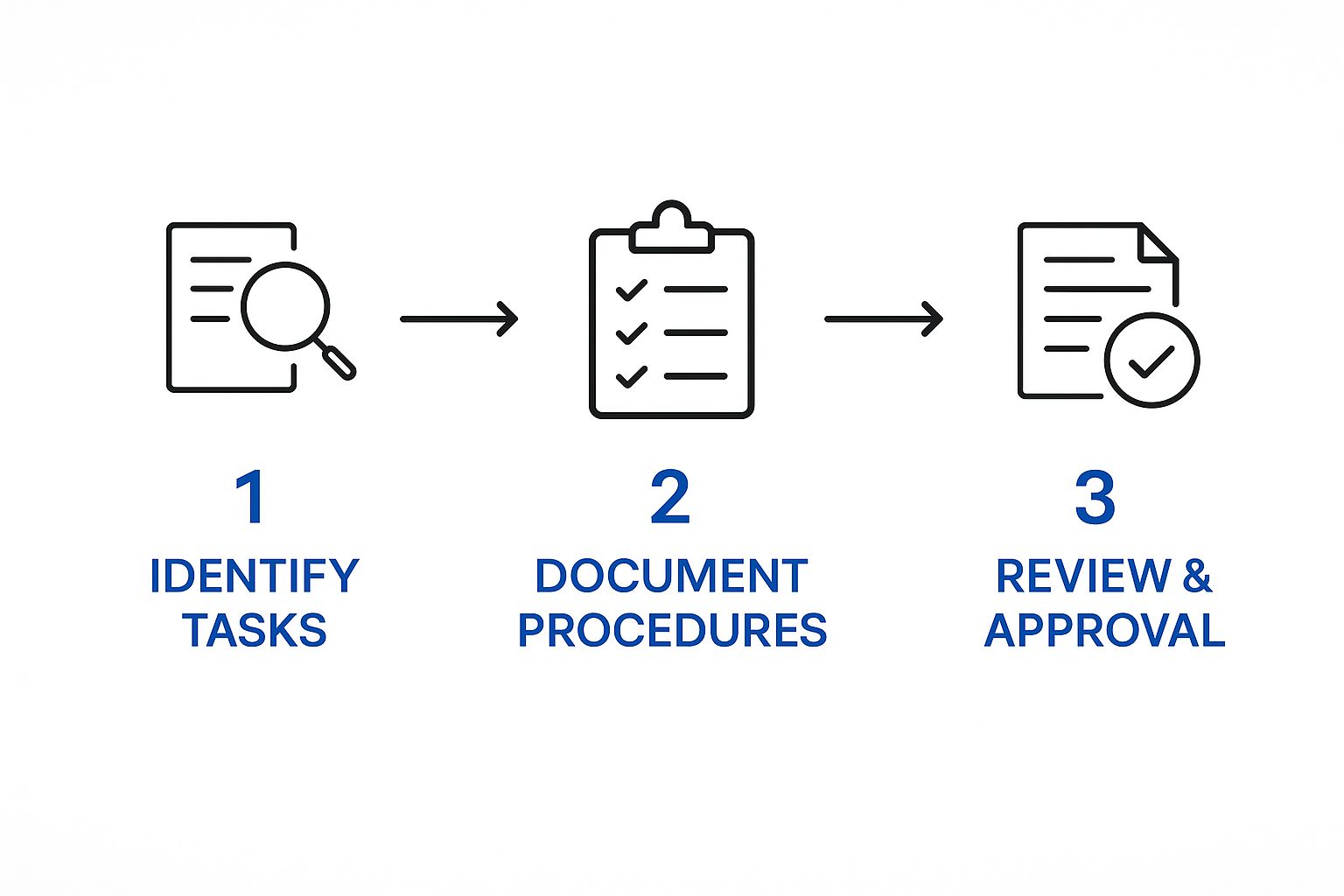
As you can see, a successful SOP always starts with clearly identifying the task before you even think about writing anything down. This ensures the final procedure is focused, relevant, and actually solves a problem.
The Four ‘D’ Framework for Creating SOPs
To really understand how to create standard operating procedures that actually work, we can break the whole process down into four distinct stages. This framework gives you a clear roadmap for turning complex processes into simple, repeatable actions that anyone on your team can follow.
Here’s a quick look at the four stages.
The Four ‘D’ Framework for Creating SOPs
| Stage | Core Objective | Key Activities |
|---|---|---|
| Define | To identify the process and establish its scope and purpose. | Pinpointing tasks needing SOPs, setting clear objectives, and involving key team members. |
| Draft | To write a clear, concise, and easy-to-follow procedure. | Choosing the right format, using simple language, and incorporating visual aids. |
| Deploy | To implement the SOP and train the team effectively. | Communicating the new process, providing training, and making the SOP accessible. |
| Develop | To review, update, and improve the SOP over time. | Establishing feedback loops, monitoring performance, and scheduling regular reviews. |
By thinking about SOP creation as a continuous cycle—defining, drafting, deploying, and developing—you create living documents that evolve with your business. This is how they remain a valuable asset rather than just a static reference point.
Setting the Stage for Successful SOPs
Before you even think about writing your procedure, there’s some groundwork to do. This prep phase is what separates a genuinely useful SOP from one that just gathers dust. Skip this part, and you’ll likely end up with documents that are too vague, disconnected from how things actually get done, or solve the wrong problems altogether.
Think of it this way: you can’t—and shouldn’t—document every single task. Your goal is to focus your energy where it will make the biggest difference.
Pinpointing Your Priority Processes
First things first, you need to figure out which processes are crying out for an SOP. A good place to start is by looking for the daily friction points and the high-stakes tasks that can’t be left to chance. I find it helps to ask a few targeted questions across different departments to see where the real pain points are.
Here are a few questions I always start with:
- Where do mistakes happen most often? If you see the same errors popping up again and again, it’s a massive red flag. It usually means a process is too complicated, poorly defined, or just isn’t being passed down correctly.
- Which complex tasks are handled by multiple people? When several team members are responsible for a critical workflow, like onboarding a new client, an SOP is your best bet for making sure everyone hits the same high standard every time.
- What is absolutely critical for compliance? Let’s be honest, some tasks are non-negotiable. For anything with legal or regulatory strings attached, like background verification or data handling, a documented procedure is a must-have.
Answering these will give you a solid shortlist. If you find a workflow that ticks all three boxes—it’s error-prone, involves multiple people, and is critical for compliance—you’ve found your top priority.
A classic mistake is trying to write one giant SOP to cover an entire department. That’s a surefire way to create a document no one will ever read. The real goal is to create focused, actionable guides for specific tasks, not a company encyclopaedia.
Defining a Clear Scope and Objective
Once you’ve picked a process, the next step is to get crystal clear on its scope and objective. What exactly will this SOP cover? Just as importantly, what will it not cover? What does success look like if someone follows this procedure perfectly? Nailing this down prevents the scope from spiralling out of control and keeps the document tight and focused.
For instance, an SOP for “Hiring” is way too broad. It’s much more effective to break it down into smaller, manageable chunks. You could create separate SOPs for:
- Posting a Job Advertisement
- Screening Candidate CVs
- Conducting First-Round Interviews
- Initiating Background Verifications
For each of these, the objective needs to be specific. For the “Screening Candidate CVs” SOP, a great objective might be: “To consistently identify the top five qualified candidates for any given role within two business days of the application deadline.” This kind of clarity gives you a benchmark for success and keeps the writer zeroed in on the essential steps.
Involving the People Who Do the Work
This might just be the most important part of the entire process. An SOP written by a manager who hasn’t actually done the task in years is probably going to miss the mark. The real experts are the employees who live and breathe this process every single day.
Their hands-on knowledge is gold. They know the clever shortcuts, the common traps to avoid, and the little details that make all the difference.
Bringing them into the process from the very beginning does two crucial things. First, it ensures your procedure is accurate and practical. Second, it gives them a sense of ownership. When people help build the process, they’re far more invested in following it. This collaborative spirit is a cornerstone of great human resources management.
By prioritising your processes, defining a sharp scope, and getting your team involved, you’re not just writing documents. You’re building powerful tools for consistency, quality, and excellence.
Drafting Procedures People Actually Want to Follow

Alright, you’ve identified the right process and brought the right people into the loop. Now it’s time to actually get something down on paper—or, let’s be real, on a screen. This is the exact point where so many companies stumble, churning out dense, jargon-stuffed documents that read more like legal disclaimers than helpful guides.
The mission isn’t just to document a process. It’s to create a living resource your team will genuinely reach for. Forget those intimidating technical manuals from the past. A truly great SOP is clear, concise, and ridiculously easy to follow. It has to speak the language of the person doing the work, not a manager ticking a compliance box.
Choosing the Right Format for the Job
Not all procedures are created equal, so why on earth would you use the same format for every single one? The complexity of the task itself should be your guide. Forcing a simple, everyday task into a multi-page document is just as useless as trying to explain a complex workflow with a basic checklist.
Here are a few formats I’ve seen work well in different situations:
- Simple Checklist: This is perfect for routine tasks where the sequence matters but the steps are dead simple. Think “Daily Office Opening Procedure” or “Pre-Publishing Blog Post Checks.”
- Step-by-Step Guide: Your go-to for most processes. It lists numbered steps in a logical order and gives a brief explanation for each. It’s ideal for something like “How to Process a Client Refund.”
- Hierarchical Format: Got a more complex procedure with different phases or decision points? This is your friend. It uses a main step-by-step list but tucks in sub-steps and bullet points to break down the chunkier actions. An SOP for “New Employee Onboarding” fits perfectly here.
- Flowchart: The absolute best choice for any process with multiple possible outcomes. A flowchart for “Troubleshooting Customer Login Issues,” for example, can visually guide an employee through a decision tree far more effectively than a wall of text.
Nailing the format from the get-go makes the entire drafting process smoother and gives you a document people will actually use. When drafting your SOPs, aim for the kind of clear, sequential approach you see in practical guides that outline necessary steps, such as this guide on how to trace someone effectively.
Writing with Clarity and Action
The words you choose can make or break an SOP. The secret is to be direct, use simple language, and always, always write in an active voice. An active voice clearly assigns responsibility and makes instructions feel immediate and actionable.
Think about the difference:
- Passive: The Client Engagement Report should be updated.
- Active: Update the Client Engagement Report in the CRM.
The active version leaves no room for doubt about who needs to do what. It’s a command, not a vague suggestion. When you add specific details, it becomes even more powerful.
Pro Tip: A truly actionable step includes the what, where, and when. For example: “Update the Client Engagement Report in the CRM every Friday by 4 PM.” There is zero ambiguity there.
This principle of clarity is directly tied to whether people will follow your procedures. A 2021 study in India found that a staggering 68% of bank branches scored average or below-average in SOP adherence, highlighting leadership and communication as critical weak points. This just goes to show that how procedures are written and shared has a direct impact on whether they’re followed at all.
Integrating Visuals to Eliminate Confusion
Let’s face it, we’re visual creatures. We process images way faster than text, which makes visual aids one of the most powerful tools in your SOP toolkit. A single, well-placed screenshot or diagram can explain a complex step more clearly than paragraphs of text ever could.
Visuals aren’t just there to look pretty; they are functional elements that reduce mental effort and prevent slip-ups. Imagine trying to describe which button to click in a software application versus just showing a screenshot with the button circled in red. It’s a no-brainer.
Here are a few types of visuals to start weaving into your SOPs:
- Screenshots: Absolutely essential for any procedure involving software. Annotate them with arrows, circles, and short text callouts to point out exactly what to look for.
- Diagrams and Flowcharts: Use these to map out the flow of a process, especially one with decision points.
- Photos: For physical tasks, a series of photos can clearly show the right way to assemble a product or use a piece of equipment.
- Short Video Clips: For those really tricky or nuanced steps, embedding a quick video (think under 60 seconds) can be a game-changer.
By combining the right format, clear language, and helpful visuals, you’re no longer just documenting a task. You’re creating a go-to resource that empowers your team, slashes errors, and turns your standard operating procedures into a genuine asset instead of something that just gathers dust on a shelf.
Bringing Your SOPs to Life Within Your Team

Let’s be honest, a perfectly written SOP is completely useless if it just gathers dust in a folder somewhere. The rollout and integration phase is where your documentation actually becomes a powerful tool for your business. This is your chance to get the team genuinely on board, embedding these new procedures right into the company’s DNA.
Success isn’t about just firing off a mass email with a new document attached. It’s about creating a thoughtful communication plan that doesn’t just explain the new steps, but gets your team excited by showing them the “why” behind it all. When people understand how a procedure makes their job easier or cuts down on errors, they’re far more likely to embrace it.
Crafting a Communication Plan That Resonates
Your rollout communication needs to be crystal clear, consistent, and focused on your employees. A great starting point is to frame the new SOP as a solution to a problem they already know exists—whether that’s reducing repetitive questions or preventing frustrating mistakes. This simple shift changes the perception from “another rule I have to follow” to “a tool that’s here to help.”
Think about using multiple channels to get the word out. Announce the new SOPs in team meetings, follow up with an email summarising the key benefits, and use your internal chat platform for reminders and quick tips. The goal is to make it impossible for anyone to say, “I didn’t know about this.”
Tailoring Training for Maximum Impact
People learn in different ways, so a one-size-fits-all training session is rarely the answer. To truly get a new procedure to stick, you need to cater to various learning styles. A blended approach often works best, giving everyone a chance to absorb the information in a way that just clicks for them.
Here are a few training methods you can mix and match:
- Hands-On Workshops: For complex, multi-step processes, nothing beats a live workshop. This lets team members walk through the procedure in a controlled environment, ask questions as they pop up, and get immediate feedback.
- Quick Video Tutorials: Create short, screen-recorded videos (under two minutes) that show specific steps, especially for software-based tasks. These are perfect for visual learners and double as a fantastic on-demand resource.
- Peer-to-Peer Coaching: Find a “champion” for the new SOP—someone who has mastered it—and have them coach their colleagues. This informal method builds confidence and strengthens team collaboration.
For example, when rolling out a new procedure for initiating background checks, you could hold a workshop to cover the full process, supported by bite-sized video tutorials for specific clicks in your HRIS. This strategy supports the kind of seamless and efficient workflows that are central to excellent business operations.
Remember, the point of training isn’t just to explain the steps; it’s to build muscle memory. The more opportunities people have to practice the new procedure, the faster it will become second nature.
Ensuring Effortless Accessibility
Even the best training will fall flat if your team can’t find the SOP when they need it most. Out of sight is truly out of mind. Your procedures must be incredibly easy to find from anywhere, at any time. Burying them in a nested folder on a shared drive is a recipe for failure.
Choose a central, searchable spot that everyone can get to instantly. This could be:
- A dedicated section on your company intranet.
- A well-organised folder in a cloud service like Google Drive or SharePoint.
- A specialised process management tool designed for SOPs.
The key is to eliminate friction. If an employee can find the answer in an SOP faster than they can ask a colleague, they will use the document. Make sure your file-naming convention is logical and consistent so a simple search brings up the right procedure immediately. It’s the combination of consistent reinforcement, coaching, and unwavering support that turns a documented process into a lived reality.
Keeping Your SOPs Relevant and Effective

Getting an SOP written and published is a huge win, but the work doesn’t stop there. The biggest mistake I see companies make is treating their SOPs like static files, destined to be filed away and forgotten. The truth is, the best SOPs are living documents that have to evolve right alongside your business.
A procedure that was perfect six months ago could be clunky or even flat-out wrong today. New tech, valuable team feedback, or shifts in the market can make an old process obsolete fast. The real secret to creating SOPs that actually work long-term is building a system for continuous improvement from day one. It’s all about being proactive, ensuring your processes always reflect the smartest and safest way to get things done.
Establish Simple Feedback Loops
Your best source of intel for improving an SOP? The people who use it every single day. They’re the ones on the ground who will spot a bottleneck, figure out a clever shortcut, or realise a step is no longer needed. Your job is simply to make it easy for them to share that knowledge.
You need formal, accessible channels for feedback. Otherwise, those brilliant insights get lost in casual chats or forgotten by the end of a hectic day.
Here are a few simple mechanisms you can set up:
- A Digital Suggestion Box: This could be a simple online form or a dedicated email address where anyone can submit ideas for SOP improvements, whenever inspiration strikes.
- Regular Team Check-ins: Carve out five minutes in your weekly team meetings to ask, “How are our processes working? Is there anything in our SOPs we could do better?”
- Direct Document Comments: If your SOPs live in Google Docs or a similar platform, turn on the commenting feature. This lets people leave feedback right on the relevant step, which provides instant context.
The goal is to create a culture where suggesting an improvement is seen as a positive, helpful contribution—not a complaint.
Measure Impact With Key Performance Indicators
Feedback is essential, but it’s qualitative. You also need hard data to truly understand if your SOPs are doing their job. This is where Key Performance Indicators (KPIs) come in. By tracking the right metrics before and after you roll out a new procedure, you can see its real-world impact in black and white.
Common KPIs to track for SOP effectiveness include:
- Task Completion Time: Is the new process actually helping the team get work done faster?
- Error Rate: Are we seeing fewer mistakes or customer issues related to this task?
- Compliance Adherence: How consistently are we meeting regulatory or internal standards?
- Training Time: How quickly can a new hire get up to speed using this SOP?
Tracking these numbers gives you objective proof of what’s working and what isn’t. It helps you focus your efforts where they’ll make the biggest difference. For example, solid procedures are the backbone of reliable compliance, so tracking pass rates for background checks is a direct measure of your SOP’s success in that area.
Schedule and Conduct Regular Reviews
A formal review schedule is your safety net. It ensures no SOP gets left behind to become stale and outdated. While you should obviously update a process immediately when something major changes, a planned review cycle catches the smaller, gradual shifts that happen over time.
Don’t wait for a problem to pop up before you review a process. Proactive reviews prevent issues before they happen, keeping your operations running smoothly. Think of it as maintenance, not just repair.
A good rule of thumb is to schedule reviews based on the process’s importance and how often it changes.
- High-Impact or Frequently Changing SOPs: Review these quarterly. This would include procedures for new software or your core sales process.
- Stable or Low-Risk SOPs: An annual review is usually plenty for these. Think about SOPs for basic office admin or IT support tasks.
When it’s time for a review, get the original team who helped create the SOP in a room, along with any new power users. Walk through the document step-by-step, comparing it to how the work actually gets done now. This structured cycle of monitoring, measuring, and refining is what turns your SOPs from a one-off project into a powerful system for operational excellence.
Have Questions About SOPs? We’ve Got Answers
Even the best-laid plans hit a snag. When you’re deep in the process of creating standard operating procedures, questions are bound to pop up. It’s a completely normal part of the process. Knowing the common sticking points ahead of time can help you navigate them with confidence instead of getting bogged down.
Let’s tackle some of the most frequent questions that come our way. The goal here is to give you quick, practical answers so your SOPs become genuinely useful tools, not just another frustrating project.
What Is the Perfect Length for an SOP?
This question comes up all the time, and the answer is refreshingly simple: there’s no magic number. An SOP should be just long enough to be crystal clear, and short enough to be actually used.
Trying to hit an arbitrary page count is a trap. It often leads to documents that are either painfully detailed or frustratingly vague. Let the complexity of the task be your only guide.
- Simple Task: A daily process, like opening the office, might only need a one-page checklist. Easy.
- Complex Process: A multi-stage workflow, such as initiating a background check, will naturally need more detail and might run a few pages.
If an SOP starts to feel overwhelmingly long, don’t just try to trim it down. See it as a clear signal that the process you’re documenting is too broad. The best move is often to break that beast down into several smaller, more focused procedures.
How Can I Get My Team to Actually Follow the SOPs?
This is the million-dollar question, isn’t it? A brilliant SOP is useless if it just collects digital dust. Getting your team on board isn’t about enforcing rules from on high; it’s about getting their buy-in.
True adoption starts with involvement. When you pull your team members into the creation process, they develop a sense of ownership over the final document. It’s human nature—they’re far more likely to use a procedure they helped build.
Beyond that, always explain the “why.” Show them how a particular SOP makes their job easier, cuts down on common frustrations, or improves safety. When employees see the direct benefit to their own day-to-day work, adoption rates skyrocket.
Finally, make sure you provide proper training and that the documents are ridiculously easy to find. And most importantly, lead by example. When managers and leaders consistently use and refer to the SOPs themselves, it sends a powerful message that these procedures really do matter.
Here’s something I’ve learned over the years: SOPs aren’t just for new hires. They are tools for consistency across the entire team. When even your most senior people reference an SOP, it normalises their use and cements their importance in the company culture.
How Often Should We Review and Update SOPs?
Think of your SOPs as living documents, not tablets of stone. To keep them relevant and useful, you absolutely have to build a regular review cycle into your workflow. As a general rule of thumb, plan to formally review every single SOP at least once a year.
However, some situations demand an immediate update. You need to revise an SOP the moment something significant changes, like when:
- A new piece of software is rolled out.
- Industry regulations are updated.
- A process is consistently failing or causing errors.
These trigger events are non-negotiable. Waiting for the annual review in these cases means you’re knowingly letting your team operate with an outdated, inefficient process. That’s a recipe for trouble.
Don’t forget that constant feedback from your team is another crucial trigger. If the people actually doing the work find a better, faster, or safer way to get something done, update the SOP immediately to reflect that improvement. The goal is to ensure your SOPs always represent the best, most current way of working.
Making informed hiring decisions with confidence starts with reliable background verification. SpringVerify offers prompt, accurate, and seamless candidate screening tailored to your business needs, integrating effortlessly with your existing HR tools to streamline your entire process.
Discover how SpringVerify can make your hiring faster and more secure


