

In a world that runs on digital, being able to confirm someone’s identity has become the bedrock of trust and security. The documents verification process isn’t just a simple manual check anymore; it’s a sophisticated, AI-powered line of defence against fraud and a critical part of staying compliant. This evolution is essential for building real customer trust and keeping bad actors out.
Table of Contents
Why Your Business Needs a Modern Verification Process

Moving away from old-school manual checks to automated systems isn’t just a trend—it’s a necessary evolution. As more of our lives and services shift online, the avenues for fraud have exploded. A solid documents verification process is your first and most important gatekeeper.
This shift is really being pushed by two major forces: the boom in digital services and regulations that are only getting stricter. Just think about the last time you opened a bank account, applied for a loan, or even signed up for a simple delivery app. Each of these moments required you to prove you are who you say you are.
The Foundation of Digital Trust
A modern verification system does much more than just tick a box on a compliance checklist. It creates a fundamental foundation of trust between your business and your customers. When people know their data and identity are being protected by strong security, their confidence in your platform naturally grows. That trust pays off in higher user adoption and loyalty.
Let’s break down the core benefits:
- Enhanced Security: Automated systems are brilliant at spotting sophisticated forgeries that a human eye would easily miss. This dramatically lowers your business’s exposure to fraud.
- Regulatory Compliance: It helps you meet strict Know Your Customer (KYC) and Anti-Money Laundering (AML) rules, saving you from potentially massive fines.
- Improved User Experience: A fast, smooth onboarding journey removes friction. It stops potential customers from getting frustrated and abandoning the sign-up process altogether.
A slow or clumsy verification step is one of the fastest ways to lose a potential customer. Today, the expectation is for a process that is not just secure, but also incredibly quick and intuitive.
The market certainly reflects this urgency. The India identity verification market, which was valued at USD 451.1 million, is expected to skyrocket to USD 1,719.7 million by 2033. This incredible growth shows just how widespread the adoption of secure verification has become across e-commerce, banking, and government services. If you want to explore the compelling arguments for adopting these modern systems, check out the reasons why online notarization is the future of document verification.
How Automated Document Verification Actually Works
To really get what makes a modern documents verification process so powerful, you need to lift the bonnet and see what’s running underneath. What exactly happens in those few seconds between a user uploading their ID and getting a “verified” status? It’s a surprisingly slick, multi-step journey driven by smart automation.
This whole sequence is built for two things: speed and accuracy. It goes from capturing a photo to pulling out the data, then checking that information against official sources. This creates a solid first line of defence against fraud.
Let’s break down how it all works, step by step.
The Initial Capture and Image Acquisition
It all kicks off with the quality of the image. A blurry, poorly lit photo of a PAN card or Aadhaar is a complete non-starter for any automated system. This is why modern platforms don’t just ask for a picture; they actively guide the user to take a good one, often with real-time feedback on their screen.
This guidance might include prompts like:
- Move to a brighter spot to get rid of shadows and glare.
- Put the document on a flat, dark surface so it stands out.
- Make sure all four corners of the ID are visible in the frame.
This first step is more critical than you might think. A crisp, clear image is the essential raw material for everything that follows. Without it, the next stages are much more likely to fail, leading to frustrating rejections for genuine users and creating a pile of manual reviews for your team.
Data Extraction With Optical Character Recognition
Once a quality image is locked in, the system uses Optical Character Recognition (OCR) technology. You can think of OCR as a digital translator. It reads the text on a document—like a name, date of birth, or address—and converts it into structured, machine-readable data.
For example, when someone uploads their driver’s licence, the OCR engine doesn’t just see a photo. It identifies and pulls out specific fields: “Name: Rohan Sharma,” “DOB: 15/04/1992,” and the unique licence number. This all happens in a flash, cutting out the slow, mistake-prone task of manual data entry.
This technology is incredibly versatile and is the backbone for a lot of administrative automation. For a great example of how it’s used in finance, check out this piece on invoice processing automation, which runs on very similar OCR principles.
This diagram gives you a simple look at the flow for verifying different documents.
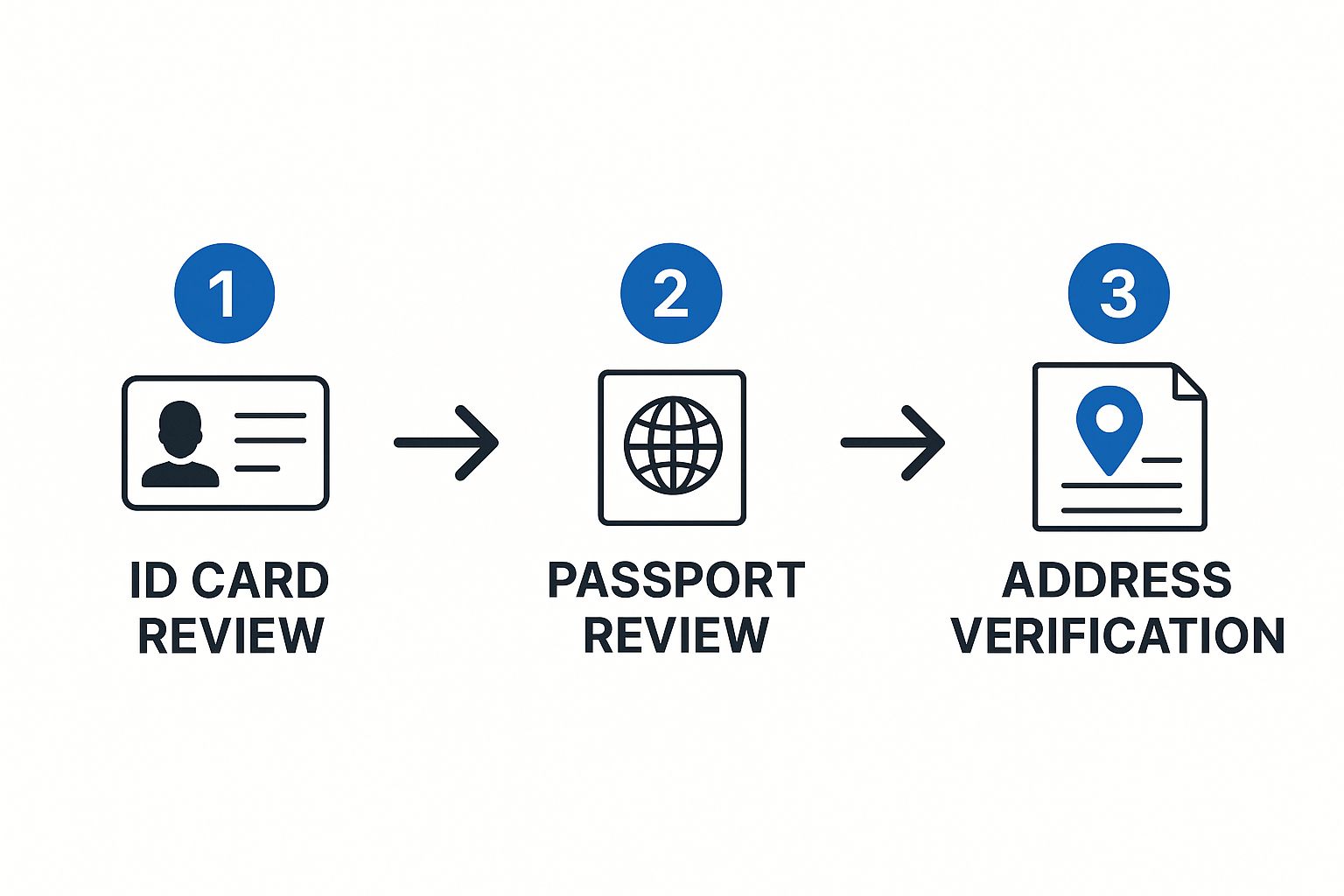
As you can see, the system is designed to handle multiple document types one after the other, from ID cards to passports, before it gets to final checks like address verification. It’s all about building a complete and trustworthy profile.
The Crucial Data Validation Stage
Pulling the data out is only half the job. The final, and most important, stage is data validation. This is where the magic really happens. The system cross-references the information OCR pulled from the document against official, authoritative databases to make sure it’s authentic. It’s the digital version of a bank teller checking a name against a central registry.
This step answers the most important question in the documents verification process: Is the information on this document legitimate and does it match official records?
Let’s say a PAN card is submitted. The system can instantly check the details against government databases. It verifies if the PAN number is actually valid and if the name and date of birth linked to it match what was on the card.
If anything doesn’t line up, the system flags it for review immediately. This real-time cross-verification is what makes automated systems so effective at stopping fraud right at the front door. It confirms not just that a document looks real, but that the information it contains is verifiably true.
Uncovering Fraud with Advanced AI Techniques

While OCR and basic data validation are solid first steps, they only scratch the surface of a truly secure document verification process. As fraudsters get more sophisticated, the technology used to catch them has to be even smarter. This is where advanced artificial intelligence steps in, moving beyond simple checks and into the world of deep forensic analysis.
Think of it as having a digital forensics expert on your team, one who can analyse every single pixel of an uploaded ID. AI algorithms can scrutinise a document for red flags that are completely invisible to the human eye. This level of inspection is what separates a decent verification system from a great one.
These systems are trained on massive datasets containing millions of document samples—both genuine and fraudulent. This allows them to learn the subtle hallmarks of authentic documents from different issuers and, more importantly, spot the tell-tale signs of a forgery.
Beyond the Naked Eye: What AI Looks For
So, what exactly is this AI looking for? It’s not just about a crooked photo or a misspelled name. The analysis goes much deeper, homing in on digital artefacts and inconsistencies that give away any manipulation.
Here are a few things advanced AI can pick up on:
- Font and Spacing Analysis: An AI can instantly tell if the font used for a name or date doesn’t perfectly match the official font for that specific ID type. It even detects tiny variations in the spacing between letters (kerning) that signal a digitally altered field.
- Pixel-Level Forensics: When a photo is pasted onto a document or text is edited, it leaves behind subtle digital breadcrumbs. AI analyses the pixels around a photograph or key data fields, looking for clues like unnatural edges or inconsistent compression patterns that betray tampering.
- Metadata Clues: Every digital file has hidden information, or metadata. An AI can examine this to see if the image was edited in software like Photoshop—a major red flag.
This multi-layered approach is what creates real security. A person might be fooled by a high-quality fake, but an AI can catch the digital trail the fraudster left behind.
By combining multiple layers of forensic checks, AI creates a security net that is far more difficult for fraudsters to penetrate. A single check might be bypassed, but fooling a dozen simultaneous algorithmic tests is nearly impossible.
Detecting Fake Document Security Features
Modern IDs are packed with security features like holograms, watermarks, and microprinting. While these are tough to replicate physically, fraudsters often try to fake them digitally. A well-trained AI knows the difference.
For example, an AI can analyse how light reflects off a supposed hologram in a video or photo. A real hologram changes its appearance based on the angle, whereas a fake, printed-on version won’t. This sort of dynamic analysis makes the document verification process significantly more robust. To see how these checks fit into a complete security framework, you can learn more about our comprehensive identity verification services.
To understand just how important this is, consider that research shows about 40.8% of all document fraud worldwide targets national ID cards. This makes them one of the most vulnerable documents globally. This is a problem that hits close to home in India, where the PAN card has become a prime target because fake templates are so easy to find online. This is why a simple visual check just isn’t enough anymore.
Fraudsters are constantly evolving their methods. Below is a table breaking down some common techniques and the technologies we use to spot them.
Common Document Fraud Techniques and Detection Methods
| Fraud Technique | Description | Detection Method |
|---|---|---|
| Photo Replacement | Swapping the original photo with another person’s image. | AI-powered facial recognition, pixel-level analysis to detect unnatural edges or compression mismatches around the photo. |
| Data Tampering | Digitally altering text fields like name, date of birth, or address. | Font and kerning analysis, checking for inconsistencies against official document templates, Optical Character Recognition (OCR) validation. |
| Hologram Simulation | Printing a static, 2D image of a hologram onto the document. | Liveness checks, video analysis that requires the user to tilt the ID to verify the hologram’s dynamic light reflection. |
| Digital Forgery | Creating a fake document from scratch using online templates. | Metadata analysis to detect editing software (e.g., Photoshop), cross-referencing against government databases, checking for invalid MRZ codes. |
This combination of checks creates a powerful defence against even the most convincing forgeries.
A Real-World Fraud Scenario
Let’s walk through an example. A fraudster wants to apply for a loan using a stolen identity. They find a high-quality PAN card template online and expertly edit it with the victim’s details, even swapping in a different photo. To a manual reviewer, the document might look completely legitimate.
But when it’s submitted to an AI-powered system, the fraud unravels in seconds.
The AI flags multiple issues: the font on the date of birth doesn’t match the government-issued standard, pixel analysis reveals the photo was digitally pasted in, and the document’s metadata shows it was recently saved from an editing program. The system automatically rejects the document, stopping the fraud before it ever gets started.
Integrating Verification Into Your Business Workflow
Having a powerful verification tool is one thing, but actually weaving it into your daily operations is where you unlock its real value. Let’s be honest, a clunky, bolted-on system creates bottlenecks, frustrates your team, and ultimately damages the user experience you’ve worked so hard to perfect. The goal is to embed the documents verification process so deeply that it becomes practically invisible.
The secret sauce here is usually an Application Programming Interface, or API. Think of an API as a secure messenger that lets your application—whether it’s a website or a mobile app—talk directly to the verification service. This direct line of communication automates the entire flow, from the moment a user uploads a document to the final verdict.
And you’ll need that automation to keep up. The global document verification market was valued at USD 5.07 billion and is on track to hit USD 10.32 billion by 2029. This boom is fuelled by the massive demand for secure tech in finance, e-commerce, and countless other sectors that rely on digital onboarding. It shows that a smooth, scalable integration isn’t just a nice-to-have anymore; it’s a necessity.
Connecting to the Verification API
So, how do you get started? The first practical step is to forge that connection between your system and the verification service. This is done using API endpoints—basically, specific URLs that your application sends requests to. It’s like dialling a direct extension to reach the exact department you need.
For example, your system would make an API call to a specific endpoint to kick off a new verification check, attaching the user’s uploaded ID images. Once the check is done, the verification service pings your platform back using something called a webhook.
This webhook delivers all the critical information you need, packaged neatly. You’ll typically get back:
- Verification Status: A straightforward indicator like “approved,” “rejected,” or “needs_review.”
- Extracted Data: All the information scanned from the document via OCR, such as the person’s name and date of birth.
- Fraud Signals: A breakdown of any red flags that were spotted during the analysis.
Automating Decisions Based on API Responses
That data you get back from the API is what powers your automated workflow. You can set up rules in your own system to handle different outcomes without anyone needing to lift a finger. This is where you can start designing a truly efficient process.
An “approved” status, for instance, could automatically trigger the next step in the user’s journey, like granting them access to their shiny new account. On the other hand, a “rejected” status could fire off an automated email explaining the issue and asking them to try again with a different document.
A “needs_review” status is especially useful. It lets you funnel tricky or borderline cases straight to a specialised team for a human look-over. This ensures that a legitimate user isn’t accidentally blocked by a purely automated decision.
Designing a User-Friendly Integration Journey
While the backend work is all about APIs and automation, the front-end user experience is just as important. The entire documents verification process should feel like a natural part of your app’s flow, not an annoying roadblock.
Imagine a food delivery platform signing up a new delivery partner. Right inside the onboarding screens, the app can prompt them to scan their driver’s licence and PAN card. By providing real-time feedback—”Hold the camera still,” “A bit more light, please”—you can guide them to take a clear picture, cutting down on submission errors from the get-go.
Once the documents are verified through the API (which should only take a few moments), the app immediately confirms their status and lets them move on. This swift, integrated experience feels professional and shows you respect the user’s time. To pull this off, you need a provider with solid integration tools. You can see how this works with our guide on SpringVerify API integrations.
Navigating Compliance and Data Security Rules

Getting a documents verification process right is about so much more than just catching fraudsters. When you handle someone’s personal data, you’re taking on a massive responsibility. One misstep with legal or security standards can lead to huge financial penalties and do lasting damage to your brand’s reputation. The goal is to build a system that’s not just effective, but secure and compliant from the ground up.
The regulatory world, especially in India, is a tricky and constantly shifting landscape. For any business verifying identities, knowing these rules isn’t just a good idea—it’s a fundamental part of how you operate. These regulations exist to protect consumers, stop financial crime, and make sure data is handled ethically.
Understanding the Key Mandates in India
In the Indian context, there are several key regulations that dictate how businesses must verify identities and manage data. Getting on the wrong side of these can stop your operations in their tracks.
- Know Your Customer (KYC): This is a big one, driven by the Reserve Bank of India (RBI) and the Securities and Exchange Board of India (SEBI). KYC mandates are the bedrock of the financial services industry, requiring businesses to confirm the identity and address of their customers to clamp down on money laundering and terrorist financing.
- Anti-Money Laundering (AML): A close cousin to KYC, AML rules require you to keep an eye on transactions and report anything that looks suspicious. A solid document verification process is your first line of defence in meeting these obligations.
- Digital Personal Data Protection Act (DPDPA): India’s landmark data privacy law. It sets the rules for how companies can collect, handle, and store personal data. A central tenet here is data minimisation—put simply, you should only collect the data you absolutely need for verification and nothing more.
Building a workflow that respects these rules means baking them directly into your verification logic. You can see how we tackle this in our detailed guides on SpringVerify’s compliance framework.
Building a Fortress Around User Data
Think of compliance and data security as two sides of the same coin. A compliant system is almost always a more secure one, designed to protect user information at every single step. It’s not enough to just tick a regulatory box; you have to put strong technical protections in place.
Imagine you’re building a digital vault. Every shred of data, from an uploaded Aadhaar card image to an extracted date of birth, has to be shielded from anyone who shouldn’t see it. This boils down to a few critical security practices.
Your approach to data security says a lot about your company’s values. Customers are far more willing to trust a business that shows a real, tangible commitment to protecting their personal information.
This commitment really rests on three core pillars of data handling.
Core Security Practices for Verification Data
- Encryption at Rest and in Transit
Any personal data you touch must be encrypted. Encryption in transit protects data while it’s zipping from a user’s device to your servers, usually with protocols like TLS. Then, encryption at rest keeps that data locked down and unreadable while it’s sitting in your database, safe from anyone without the decryption key. - Secure Data Storage and Access Control
Store verification data in secure environments with tight access controls. Let’s be honest: not everyone in your company needs to see a user’s sensitive documents. Implementing strict role-based access control (RBAC) is non-negotiable, ensuring only authorised staff can view or manage this information. - Data Minimisation and Retention Policies
The DPDPA really pushes the principle of data minimisation. Don’t collect what you don’t need, and don’t hang onto it forever. You need clear data retention policies that spell out exactly how long you’ll store verification data and ensure it’s wiped securely once it’s no longer needed for legal or business reasons.
Regular check-ups are essential to keeping your data security strong. Using a solid IT security audit checklist can help guide your internal reviews and catch potential weak spots before they become real problems. By weaving these security and compliance principles into your documents verification process, you create a system that not only runs smoothly but also builds and maintains the trust of your customers.
Finding the Sweet Spot: Accuracy and User Experience
A solid documents verification process isn’t just about catching fraudsters; it’s about doing so without making life difficult for your genuine customers. The real goal is to strike that perfect balance where security is tight, but the user’s journey is still quick and smooth. This harmony is what separates a decent verification system from a great one.
It all kicks off the moment a user tries to upload their document. Instead of just asking for a photo and hoping for the best, a smarter system gives feedback in real time. For example, if someone uploads a blurry picture of their PAN card, the system can instantly say, “This image is a bit fuzzy. Could you try again in a brighter room?” This simple, interactive nudge dramatically improves the quality of the documents you receive, cuts down on rejections for legitimate users, and sets the whole process up for success from the get-go.
Blending Automation with a Human Touch
While automation is a workhorse, handling the bulk of checks with incredible speed, it’s not infallible. You’ll always run into tricky situations—an international passport with an unusual font, or an ID that’s a bit worn but still perfectly valid. If you rely only on automated rejections for these, you’ll end up with false positives, turning away real customers by mistake.
This is exactly where a hybrid model shines. By smartly combining automation with manual reviews, you create a system that’s far more reasonable and fair. Instead of an outright “rejected,” the automated system can flag an application as “needs review.” This sends it to a trained human agent who can apply some context and make a final call.
This approach ensures you don’t lose good customers over minor document flaws. It’s the best of both worlds: the speed of machines paired with the critical thinking of people.
The most effective verification workflows aren’t a battle of humans versus machines, but a partnership. Automation does the heavy lifting, while human experts handle the exceptions that require judgement and understanding.
Why You Can’t ‘Set It and Forget It’
Fraudsters don’t take breaks; their methods are always changing. A verification system that’s set up once and then left alone will become a weak link surprisingly fast. That’s why continuous monitoring and adaptation are non-negotiable for long-term security.
This means you need to be proactive.
- Dig into Failure Points: Regularly look at why verifications are failing. This can uncover new fraud tactics or show you where your user instructions could be clearer.
- Keep Your AI Models Sharp: Your fraud detection algorithms need to be constantly retrained with fresh data to spot the latest forgery techniques.
- Tweak Your Workflows: Watch how users move through the process. This helps you find and fix friction points, making the journey smoother and more intuitive.
By staying vigilant and constantly refining your documents verification process, you build a resilient system that not only protects your business but also delivers the seamless experience your customers expect.
Answering Your Top Questions
Even when you have a good handle on the documents verification process, a few questions always seem to pop up. It’s completely normal. Let’s walk through some of the most common ones I hear to clear up any confusion so you can move forward with total confidence.
What Is the Difference Between Document and Identity Verification?
This is a great question, and it’s easy to see why people get them mixed up. They’re often used together, but they are two very distinct, crucial stages.
Think of it like this:
- Document Verification is all about the thing. It confirms whether a government-issued ID, like a PAN card or passport, is authentic and hasn’t been tampered with. It’s asking one simple question: “Is this document real?”
- Identity Verification is about the person. It takes that now-confirmed genuine document and links it to the actual, living person presenting it. This is often done with a quick selfie match or a liveness check. It answers the bigger question: “Is this the right person holding this valid document?”
You absolutely need both for a complete, secure process. One confirms the ID is legit, the other confirms the person holding it is who they say they are.
How Does AI Improve the Documents Verification Process?
AI doesn’t just improve the process; it completely changes the game. It makes verification faster, smarter, and far more secure than any manual check could ever hope to be. For starters, it automates data extraction using OCR, which slashes human error and speeds everything up immensely.
But the real magic is in the security. AI algorithms are trained to analyse thousands of tiny data points—hidden security features and digital fingerprints—to spot sophisticated fakes that a human would easily miss.
AI isn’t just about going faster; it’s about going deeper. It can catch subtle inconsistencies in fonts, detect pixel manipulation around a photo, and spot fake digital holograms—things that are practically invisible to the naked eye. This makes your entire verification system incredibly robust.
On top of that, machine learning means the system gets smarter over time. It learns from new fraud attempts, so your defences are constantly evolving to stay one step ahead of the bad guys.
What Are the Key Compliance Requirements in India?
Navigating compliance in India is non-negotiable. The big ones you need to know about are driven by the RBI and SEBI, specifically their Know Your Customer (KYC) and Anti-Money Laundering (AML) mandates. These aren’t just suggestions—they are legal requirements for businesses, especially in the financial sector, to verify client identities to prevent financial crime.
Beyond that, the Digital Personal Data Protection Act (DPDPA) is a major factor. It dictates exactly how you must collect, handle, and store all the personal data you gather during verification. The DPDPA puts a huge emphasis on getting clear user consent, practising data minimisation (meaning you only collect what is absolutely necessary), and ensuring all that information is stored securely. Getting this wrong can lead to some serious penalties.
Ready to build a faster, safer, and fully compliant onboarding experience? SpringVerify offers a robust and seamless documents verification process designed for businesses of all sizes. Our powerful API and user-friendly platform make it easy to stop fraud, stay compliant, and verify identities with confidence. Discover how we can help you by visiting SpringVerify.


